
🎙️ Tester's Verdict (Audio)
Listen to our final thoughts
The end of the #N/A and #VALUE! ordeal?
Yes, the integration of Gemini in Google Sheets effectively ends the nightmare of #N/A and #VALUE! errors by allowing users to debug and repair them with a single click. No more hours spent scouring forums or deciphering cryptic error messages like the famous #VALUE! or the confusing #DIV/0!. The principle is disarmingly simple: once a formula returns an error, a “Fix” button appears. One click, and Gemini steps in. It doesn’t just offer a raw correction; The AI analyzes the intent behind the formula by examining not only the syntax but also the complete structure of the document, column headers, and adjacent data types. What struck me technically is this ability to contextualize. Until now, Sheets offered basic formula suggestions and syntax help, but correcting complex errors, often linked to a misunderstanding of the user’s data model, remained a manual challenge. Gemini now offers a clear textual explanation of the problem and generates the rectified formula, acting as a true built-in tutor.
What Gemini really understands about your spreadsheet
Gemini understands the global context of your spreadsheet, analyzing column headers, neighboring data types, and structural relationships to deduce your exact logical intent. Instead, it works like a detective studying the entire scene before pointing to a culprit: it looks at neighboring columns, headers, and the data type in each range to guess what the formula was supposed to do. It is this reading of the context, more than the simple correction, that changes the game – no more need to search for the answer on a forum or in Google’s documentation.
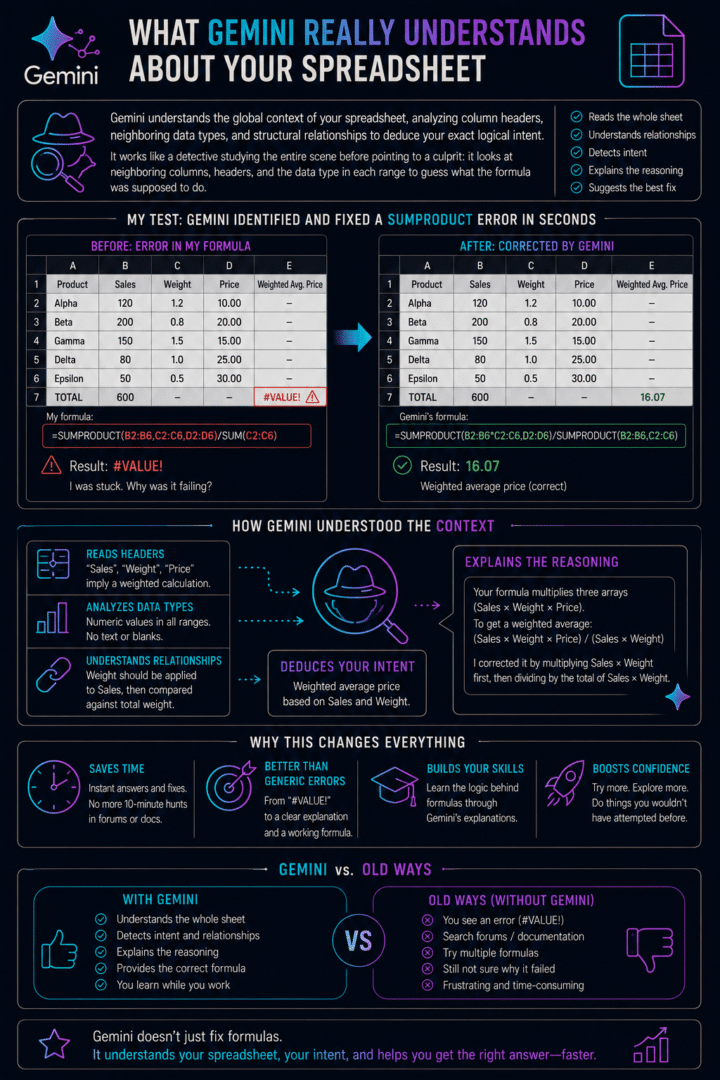
What’s clever isn’t that Gemini checks each formula in isolation – it reads the whole sheet first. Column headers, neighboring data types, the overall shape of your table: all of that feeds into how it guesses what a broken formula was meant to do, and it explains that reasoning instead of just handing you a fix. That context-awareness is also what makes it useful day to day. Instead of hunting for the right syntax elsewhere every time something breaks, you get an explanation and a corrected formula on the spot – a real step up from the generic #VALUE! message Sheets used to leave you with.
Who wins, and at what cost?
This feature primarily benefits teams and individual power users who save hours of manual troubleshooting, but it comes at the cost of a paid Google Workspace or Google One AI Premium subscription. On the consumer side, you need to subscribe to Google AI Pro or Ultra. For businesses and schools, the feature is reserved for Workspace Business Standard, Business Plus, Enterprise Standard, or Enterprise Plus plans – free or entry-level plans are left out. For occasional formula correction, the subscription seems hard to justify; for a team handling complex spreadsheets daily, the calculation is different. Google had proposed, until July 15, 2026, an offer allowing you to temporarily exceed the usual usage limits to test the system. This offer has now come to an end and each monthly plan once again applies its usual usage limit. In the field, companies that have started integrating this type of AI into their productivity tools report, above all, time saved on repetitive tasks and fewer unnecessary back-and-forths internally. According to McKinsey & Company, June 2023, generative AI could increase labor productivity by 0.1 to 0.6% annually by 2040 across the global economy – a potential that largely depends on how quickly companies actually redeploy the time thus freed up.
💡 The limitations we encountered in real-world use
Gemini fixes my formulas in a second, and that’s exactly the problem: I don’t even remember why VLOOKUP was crashing last time. By letting the AI debug for me, I feel like I’m losing the reflex to understand the logic behind my own spreadsheets – and the day the tool isn’t there, I’m left exposed. This is particularly true when the AI tries to be too smart: some users have already pointed out on online forums that Gemini sometimes unilaterally redesigns formulas instead of just verifying their existing references, creating unexpected confusion.
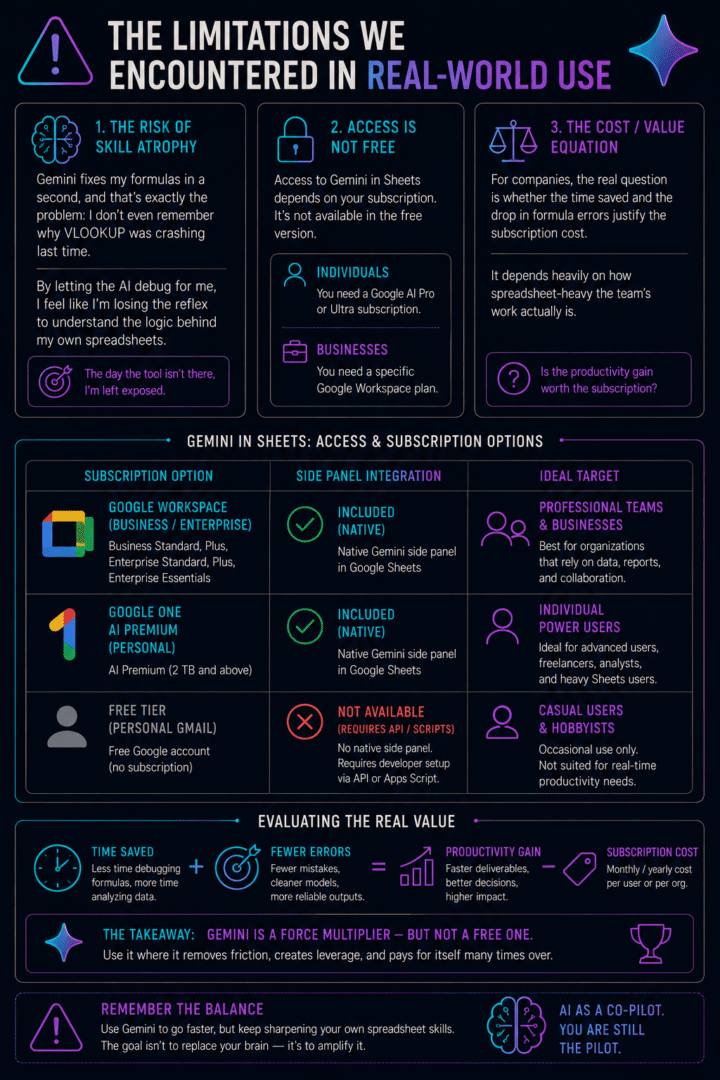
So, regarding access: it’s not free. You need a Google AI Pro or Ultra subscription if you’re an individual, or a specific Workspace plan on the business side – the feature doesn’t exist in the free version of Sheets.
| Subscription Option | Side Panel Integration | Ideal Target |
|---|---|---|
| Google Workspace (Business/Enterprise) | Included (Native) | Professional Teams & Businesses |
| Google One AI Premium (Personal) | Included (Native) | Individual Power Users |
| Free Tier (Personal Gmail) | Not Available (Requires API/Scripts) | Casual Users & Hobbyists |
For companies weighing whether to adopt it, the real question is whether the time saved and the drop in formula errors justify the subscription cost. It depends heavily on how spreadsheet-heavy the team’s work actually is.
What Gemini actually changes in my daily use of Sheets
Gemini acts as an extremely efficient smart crutch in my daily use, eliminating the stress of manual debugging for common syntax errors while saving hours of lost productivity. A beginner can finally type “I want the average sales by region” without knowing SUMIF or the pitfalls of French/English syntax. And even I, who know my functions, save a ton of time on silly mistakes – a forgotten parenthesis, a poorly aligned range.
What truly impresses is Gemini’s ability to elucidate why a formula functions, rather than simply confirming its operation. The inherent risk isn’t the tool itself, but the potential for users to become overly reliant, neglecting their own understanding of gemini sheets functions and formula troubleshooting. When a spreadsheet’s document structure becomes too intricate for AI, personal expertise remains indispensable.
What it looks like in practice
Essentially, even novices can now confidently tackle complex gemini google sheets formulas without apprehension. This integration of Google Sheets AI translates directly into significant time savings: instead of protracted manual troubleshooting, users can leverage the built-in AI formula helper to swiftly repair formulas and resume their analytical tasks.
Bonus: by letting Gemini analyze spreadsheet intent and explain its logic, you end up understanding how formulas work a bit better, almost despite yourself.
In short, Google is making its tools easier to use. And Gemini in Sheets isn’t just a corrector – it makes you want to try things you wouldn’t have dared to do before.
Does Gemini work with Excel files (.xlsx) in Sheets?
Currently, Gemini’s formula correction and side-panel features work best with native Google Sheets files. If you are working on an imported Microsoft Excel file (.xlsx), you will need to click on File > Save as Google Sheets first to unlock full AI troubleshooting capabilities.
Chargement de la galerie…




Creator of IActualité and a rigorous tech tester. With a keen analytical mind and surgical precision, I put AI tools through their paces to deliver practical guides and transparent, unfiltered verdicts. Passionate about Linux, robots, and pop culture!
L'intelligence artificielle, c'est comme un T-Rex dans un parc d'attractions : c'est fascinant à observer, mais il vaut mieux savoir exactement comment la clôture a été codée avant de s'en approcher.



0 Comments