
- The Real Limits of Free AI in 2026
- Comparing Free AI Image Generation Quotas in 2026
- The Google AI Studio Secret for Creators
- The Ideal Image Prompt Structure
- A Step-by-Step Guide to Writing Your First Prompt
- The Step-by-Step Iterative Refinement Method
- Technical Pitfalls to Avoid in the Field
- Can You Use Free AI-Generated Images Commercially?
🎙️ Tester's Verdict (Audio)
Listen to our final thoughts
My old workflow for illustrating my editorials was an absolute disaster. Back in 2021, I would spend hours scouring royalty-free image banks only to end up with bland clichés of robotic handshakes or blue-lit server racks. Today, any creator can generate free AI images directly from their browser in a matter of seconds, provided they have the right approach.
The Real Limits of Free AI in 2026
In 2026, the real limits of free AI image generators lie in strict daily usage quotas, slower rendering speeds after initial boosts, and restricted commercial rights. Computing infrastructure is expensive, forcing tech giants to impose strict quotas.
While ChatGPT’s premium tiers offer robust image generation, free access to DALL-E 3 is typically provided via Bing Image Creator. According to Microsoft’s Bing Image Creator documentation, users receive 15-25 “boosts” daily for faster image generation, after which creation speed slows significantly. This limited fast generation can still be restrictive for regular professional or creative use.
Meanwhile, other platforms offering limited free tiers, such as Leonardo.ai, provide around 15-30 daily image generations depending on complexity, as outlined in Leonardo.ai’s official pricing page. These quotas, while higher than some, still necessitate careful prompt management. However, a major alternative exists to bypass these restrictions without spending a single penny.
Comparing Free AI Image Generation Quotas in 2026
Free AI image quotas in 2026 range from strict limits of 2 to 3 daily images on ChatGPT to highly generous tiers of up to 1,000 daily generations on Google AI Studio.
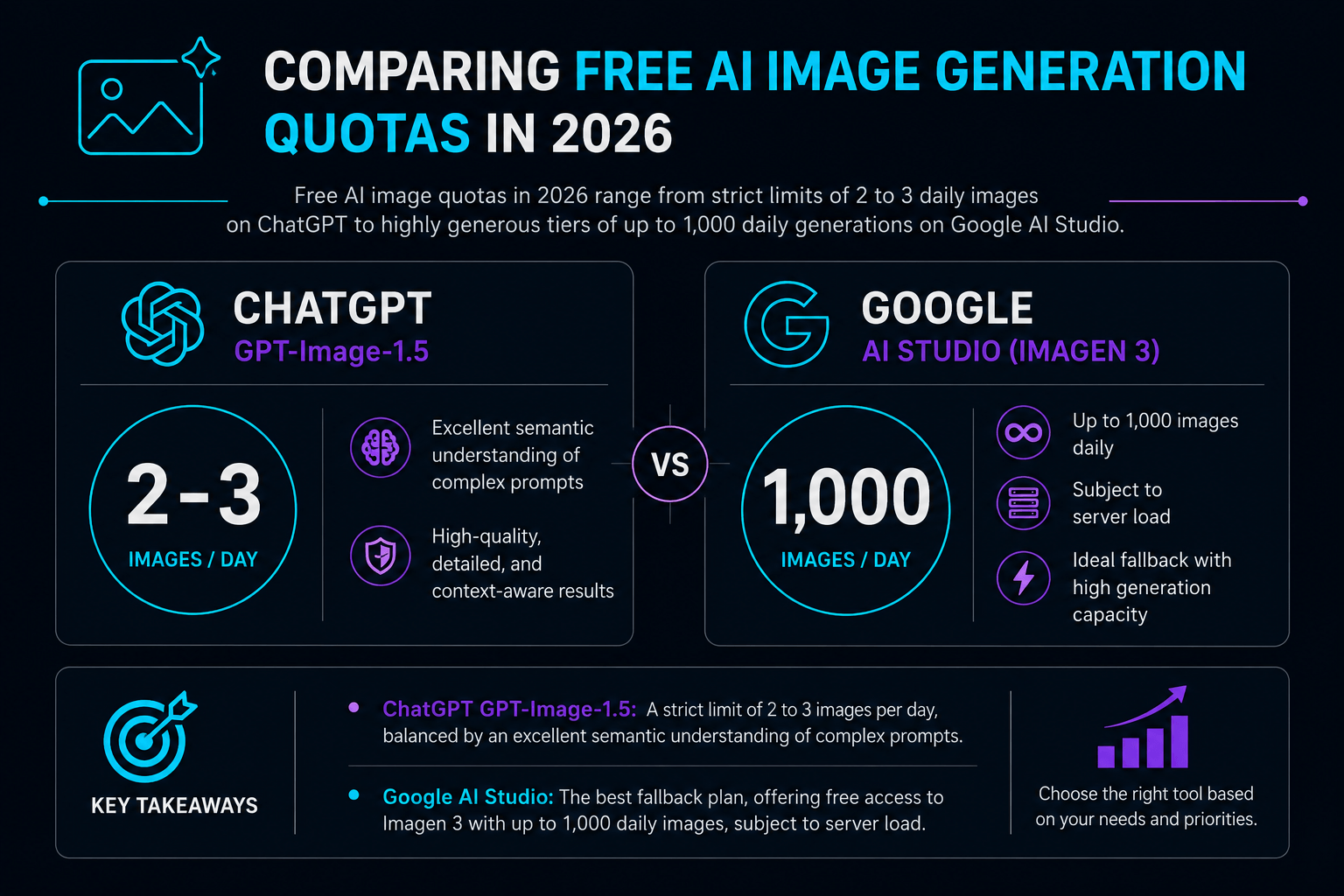
Key Takeaways from These Quotas
- ChatGPT GPT-Image-1.5: A strict limit of 2 to 3 images per day, balanced by an excellent semantic understanding of complex prompts.
- Google AI Studio: The best fallback plan, offering free access to Imagen 3 with up to 1,000 daily images, subject to server load.
| Platform | Daily Free Quota | Key Strength | Main Limitation |
|---|---|---|---|
| Google AI Studio (Imagen 3) | Up to 1,000 images | High volume, direct developer settings | Spartan UI, dynamic rate limits |
| Leonardo.ai | 15 – 30 images | Advanced styling, community models | Complex credit system |
| Bing Image Creator (DALL-E 3) | 15 – 25 fast boosts | Excellent prompt comprehension | Slow generation after boosts |
| ChatGPT (GPT-Image-1.5) | 2 to 3 images | Exceptional text rendering | Extremely restrictive daily limit |
The Google AI Studio Secret for Creators
To bypass the restrictive daily limits of the consumer Gemini app, creators can use Google AI Studio to generate up to 1,000 high-quality images daily for free. However, accessing it directly through Google’s developer console is a complete game-changer.
According to Google Cloud’s official Vertex AI pricing for Generative AI models, developers can access free tiers with substantial rate limits for models like Imagen, often enabling hundreds of image generations daily for non-commercial use, depending on model and usage patterns. It is the ultimate trick to test your visual concepts without significant financial barriers.
Granted, the interface is a bit more spartan than a simple chatbot. However, it offers essential advanced settings, such as precise aspect ratio selection (1:1, 16:9, 3:4) and safety filter adjustments. Consequently, you regain total control over your graphic production.
The Ideal Image Prompt Structure
The ideal structure for an AI image prompt starts with a precise description of the subject, followed by style, lighting, environmental setting, and technical camera details.
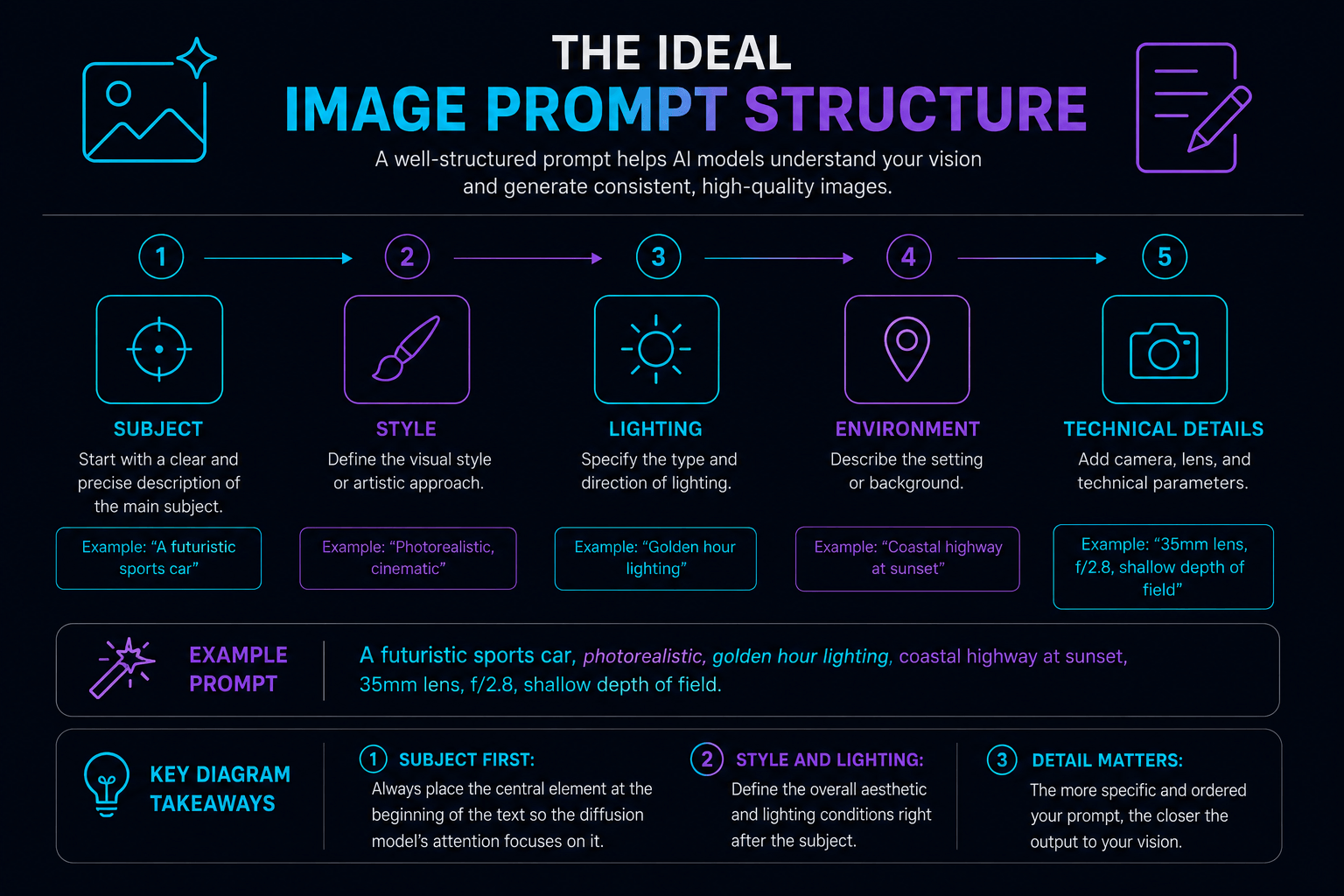
Key Diagram Takeaways
- Subject first: Always place the central element at the beginning of the text so the diffusion model’s attention focuses on it.
- Style and lighting: Define the overall aesthetic (photorealism, 3D illustration) and lighting (golden hour, neon) right after the subject.
A Step-by-Step Guide to Writing Your First Prompt
To get professional-quality results on your very first try, you must follow a structured five-step process rather than relying on vague descriptions. Instead, apply this five-step, step-by-step method to structure your request.
First, start by describing the main subject with precision. For example, instead of writing ‘a man’, write ‘an elderly watchmaker, focused on his work’. This semantic precision helps the AI lay the foundation of the composition.
Next, define the environment and background of the scene. Specify whether the action takes place in a workshop cluttered with brass tools or under a bright glass roof. The model will then seamlessly connect the subject to its setting.
Then, manage the lighting and color atmosphere. Warm, soft side lighting will create a dramatic feel, while cold, uniform lighting will evoke a clinical style. This parameter dictates the emotional tone of the image.
After that, specify the desired artistic style. For a realistic render, mention a photographic style with a shallow depth of field. On the other hand, for an editorial project, you might opt for a clean vector illustration.
Finally, add the technical rendering details. Specify the focal length (for example, an 85mm lens for a portrait) and avoid adding filler words like ‘ultra-detailed’ which only confuse modern algorithms.
The Step-by-Step Iterative Refinement Method
Don’t start a new prompt from scratch if the first attempt isn’t perfect; instead, use local editing features.
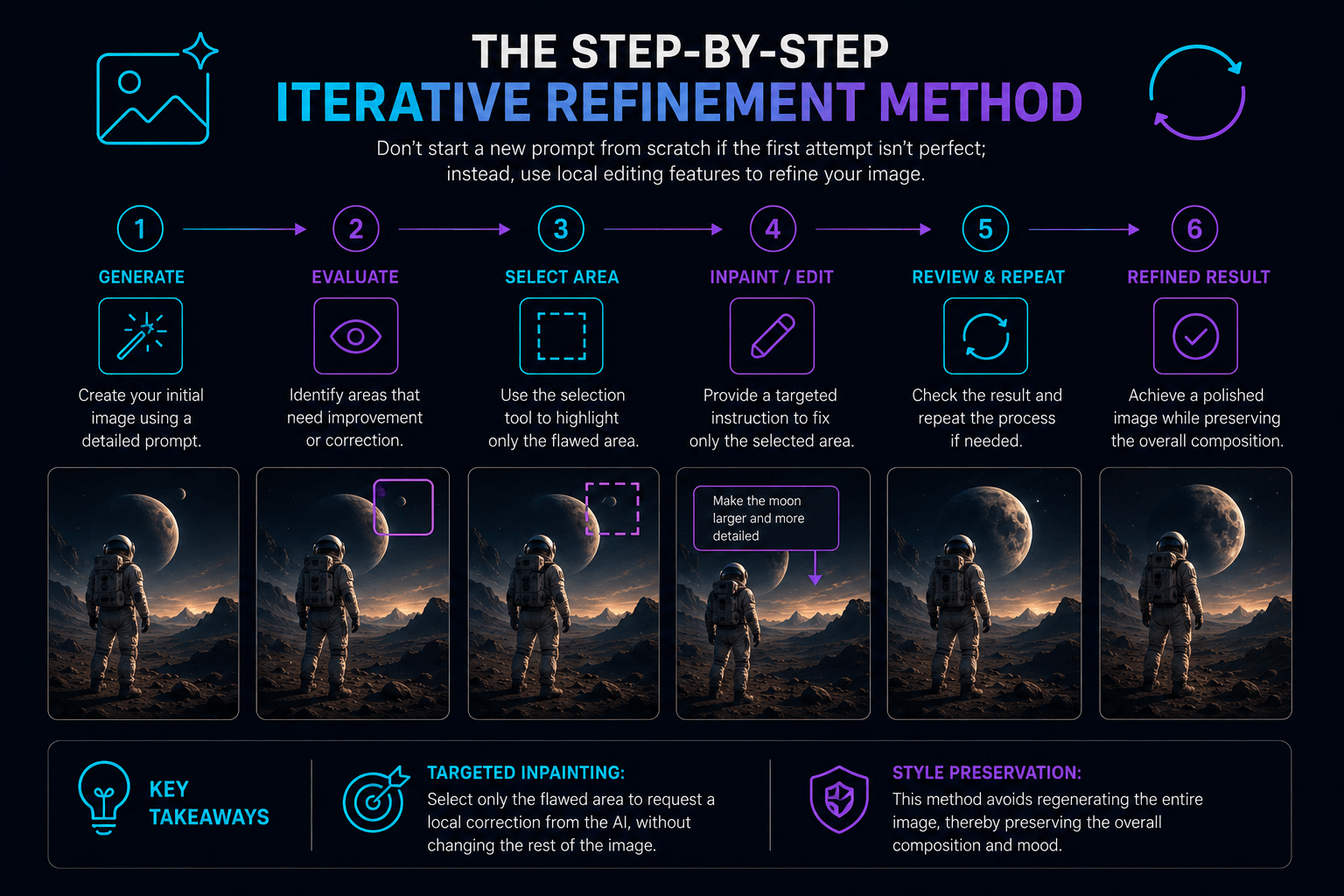
Key Takeaways from This Workflow
- Targeted inpainting: Select only the flawed area to request a local correction from the AI, without changing the rest of the image.
- Style preservation: This method avoids regenerating the entire image, thereby preserving the overall composition and mood.
Technical Pitfalls to Avoid in the Field
When working with free AI image generators, the most critical technical pitfalls to avoid are anatomical inaccuracies and flawed embedded text rendering. The main hurdle involves modeling complex anatomical details like hands or reflections in eyes.
To work around this, opt for wider framing or angles where hands are not the central element of the scene. Furthermore, embedded text generation remains a historic weak point for many models.
If you absolutely must integrate words into your image, it is best to use ChatGPT’s GPT-Image-1.5 model. It features a text encoder that is significantly more powerful than its direct competitors, reducing AI-generated spelling mistakes.
💡 Our Tech Analysis:
In my view, the battle of free image models is now fought on semantic consistency rather than pure resolution. While ChatGPT shines in understanding subtle text nuances thanks to its recent models, Google AI Studio offers unmatched raw power and usage volume for power creators. My practical advice: use ChatGPT to draft complex concepts requiring embedded text, and switch to AI Studio for your high-volume graphic production needs.
In five years, we probably won’t be writing long text blocks to design our visuals. Direct neural interfaces or real-time voice canvases will allow us to shape graphic worlds with just a glance or an intonation. Until then, mastering the art of the structured prompt remains your best asset to stand out.
Can You Use Free AI-Generated Images Commercially?
Whether you can use free AI-generated images for commercial projects depends heavily on each platform’s terms of service. For instance, while images generated through Google AI Studio’s free tier are typically restricted to non-commercial development and testing, platforms like Leonardo.ai permit commercial use even on their free tiers, though you must occasionally credit the tool. Always review the specific platform’s licensing agreements before incorporating free AI assets into client work, advertising, or monetized content to avoid potential copyright issues.
Chargement de la galerie…

Creator of IActualité and a rigorous tech tester. With a keen analytical mind and surgical precision, I put AI tools through their paces to deliver practical guides and transparent, unfiltered verdicts. Passionate about Linux, robots, and pop culture!
L'intelligence artificielle, c'est comme un T-Rex dans un parc d'attractions : c'est fascinant à observer, mais il vaut mieux savoir exactement comment la clôture a été codée avant de s'en approcher.
0 Comments