

- Why understanding Google Gemini tools seems so difficult
- Mapping the use cases of the Google Gemini ecosystem
- How to find your way around the constellation of Gemini tools
- Which model to use depending on the complexity of your tasks
- Balancing performance and cost of Gemini models
- The concrete limitations of Google’s AI in daily use
- How to effectively integrate Gemini into your professional workflow
- Integrating AI into a document monitoring process
🎙️ Tester's Verdict (Audio)
Listen to our final thoughts
Why understanding Google Gemini tools seems so difficult
The multiplication of tools under the Gemini name creates legitimate confusion for the user. Google integrates its artificial intelligence everywhere. It invites itself from the mobile assistant to desktop applications, including Chrome. This omnipresence gives the impression of a complex ecosystem where names change regularly. According to Statista (2024), 67% of AI decision-makers plan to increase investment in generative AI within the next year . This growth is explained by the forced integration of the assistant into the daily services of millions of people.
Mapping the use cases of the Google Gemini ecosystem
This diagram helps locate the different tools in the range according to their main access method.
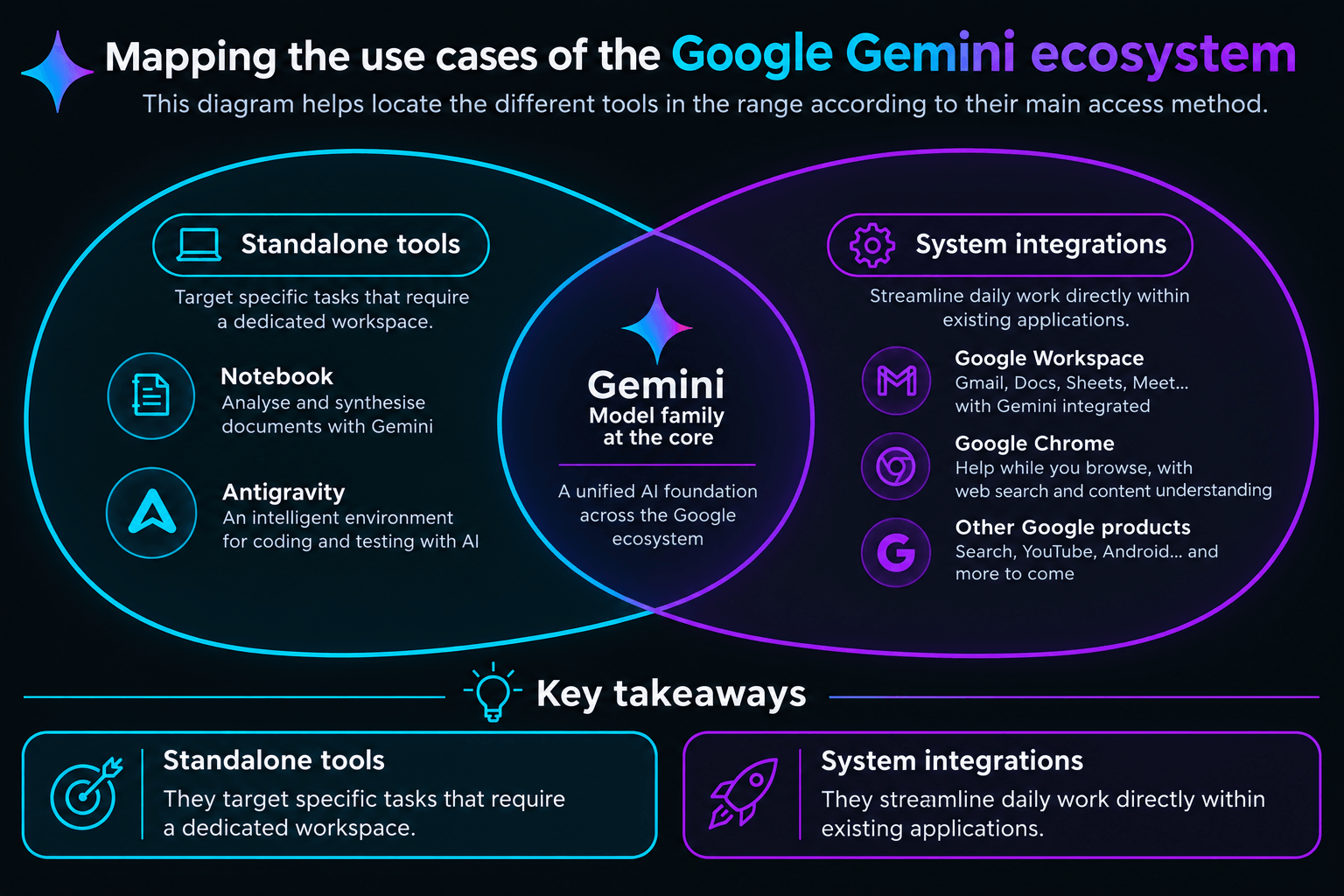
Key takeaways from this distribution
- Standalone tools: They target specific tasks that require a dedicated workspace.
- System integrations: They streamline daily work directly within existing applications.
How to find your way around the constellation of Gemini tools
The Gemini range includes independent standalone tools and integrations grafted onto Google’s existing ecosystem. This separation adapts the AI to your actual needs, whether for document research or office tasks.
Standalone interfaces for direct use
The classic conversational assistant serves as the main entry point. It allows you to chat, analyze files, or generate images independently. For more targeted needs, Google offers highly effective specialized services. Gemini Notebook, for example, analyzes your documents to create interactive summaries or mind maps. The operation of Gemini Notebook relies on a strict grounding architecture. When I upload a 200-page PDF, the AI generates a study guide in seconds. Citations link directly back to the original page numbers. This is a major asset for avoiding pure hallucinations, even though some students have reported that recent updates cause the tool to skim too much, generating shorter and less comprehensive reports. Software development has its own platform with Google Antigravity. The 2.0 version from May 2026 manages multiple agents in parallel to automate code writing. It advantageously replaces the old Gemini CLI command-line interface. Creators can use Flow Music to design music tracks. Meanwhile, Google Stitch generates mockups that can be exported to Figma.
Invisible integrations in your daily applications
AI also invites itself right where you already work, without requiring additional tools. In Google Search, AI Mode answers complex questions directly on the search page. Chrome integrates a side panel capable of summarizing any article in one click. On mobile, Gemini replaces the old Google Assistant to control your smartphone by voice. The Workspace office suite benefits from deep integration. I tested the writing tool in Gmail and Docs to draft meeting minutes. The time saved is measurable, but the writing style sometimes lacks natural flow. Slides and Sheets also benefit from these features to design presentations or debug complex formulas. In Google Sheets, help with formula construction proves particularly useful for complex syntaxes. I submitted cases of nested formulas combining INDEX and MATCH. The assistant generated the exact structure while explaining each argument. The time saved is obvious compared to searching manually on forums, although some users on Reddit noted that Gemini sometimes outputs Excel-specific formatting that causes errors when executed directly in Sheets. For Gmail, the thread summary feature allows you to quickly catch up on a missed conversation. The AI extracts key points and required actions for each collaborator. However, drafting automatic replies still suffers from an excessively corporate tone.
Which model to use depending on the complexity of your tasks
The choice of model depends on your projects. Use Gemini Flash for speed, and reserve Pro or Deep Think for reasoning.
The classic range for text and reasoning
Text models are organized according to a clear nomenclature combining a generation number and a capacity suffix. Google is heavily accelerating the pace of its updates to remain competitive against its direct rivals. The default model is Gemini Flash, known for its speed. Gemini 3.7 Flash was released on August 13, 2026. According to Gartner (2024), 80% of the engineering workforce will need to upskill due to generative AI by 2027. This model handles most queries for the consumer application and the search engine. For work requiring in-depth analysis, Gemini Pro is the way to go. The 3.1 Pro version excels in logic and processing large volumes of data. The Deep Think mode explores multiple lines of thought in parallel to solve complex scientific problems. Developers, on the other hand, can use Gemini Flash-Lite for simple, large-scale tasks via the API.
| Model | Primary Use | Strengths |
|---|---|---|
| Gemini 3.7 Flash | Daily tasks and fast coding | Execution speed and very low cost |
| Gemini 3.1 Pro | Complex reasoning and mathematics | 1 million token context window |
| Gemini Deep Think | Scientific research and engineering | Exploration of parallel logical paths |
| Gemini Flash-Lite | High-volume API requests | Maximum savings for developers |
Creative models for multimedia content
The ecosystem is not limited to text. Google offers specific models for each visual or audio content format. For image generation, the Nano Banana model allows designing and editing visuals from precise descriptions. Video creation relies on Veo, integrated directly into the Vids editing tool. To combine multiple formats, Gemini Omni simultaneously processes text, audio, and images to produce multimodal videos. Music, on the other hand, benefits from the Lyria model, which powers the Flow Music platform.
Balancing performance and cost of Gemini models
This graph shows the positioning of the different models according to their computing power and operating cost.
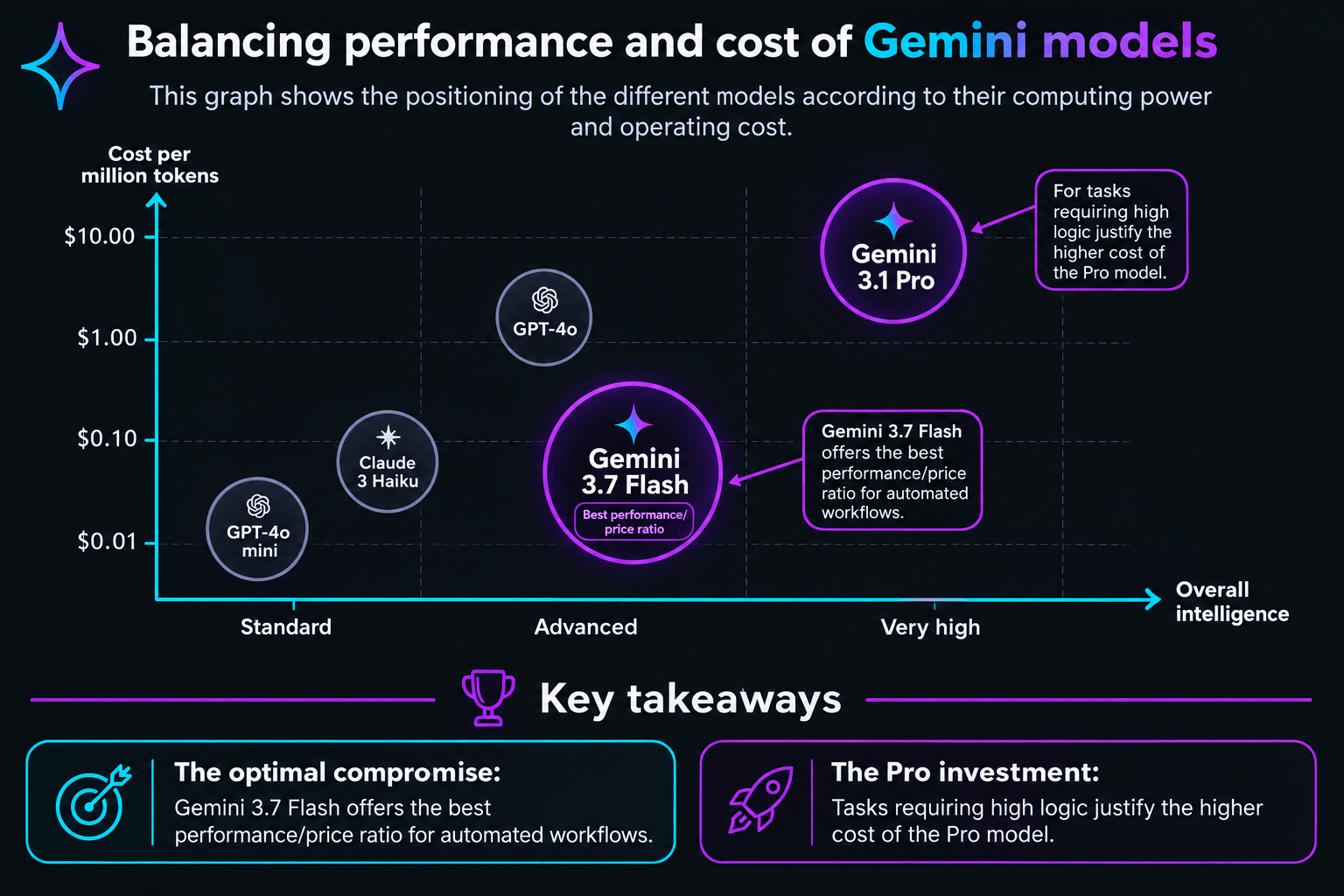
Key takeaways from this data
- The optimal compromise: Gemini 3.7 Flash offers the best performance/price ratio for automated workflows.
- The Pro investment: Tasks requiring high logic justify the higher cost of the Pro model.
The concrete limitations of Google’s AI in daily use
The Gemini ecosystem suffers from a significant error rate on complex tasks. It lacks precision compared to its direct competitors.
The persistence of hallucinations and overconfidence
One of Gemini’s main flaws lies in its way of asserting untruths with disconcerting confidence. During my analytical tests, the model sometimes invented non-existent trends to support its reasoning. This behavior is accompanied by a lack of immediate self-correction. Other tools nuance their answers when in doubt. Gemini tends to persist in error without precise prompting. This technical limitation makes it necessary to double-check every critical analysis with a rigorous verification of the original sources. During my tests on CSV files containing financial data, Gemini sometimes modified actual figures to justify an incorrect logical conclusion. This phenomenon is heightened by the model’s tendency to hide its doubts. It prefers to formulate a false answer with perfect confidence rather than admit its calculation limits.
The persistent gap behind market leaders
Independent benchmarks confirm this gap on the most demanding use cases. For professionals needing absolute rigor, other solutions keep a step ahead. According to the Nielsen Norman Group (2025), generative AI systems are susceptible to hallucinations, producing outputs that seem plausible but are incorrect or nonsensical. Legal AI tools, for example, have been found to hallucinate more than 17% of the time, even with advanced methods like retrieval-augmented generation (RAG). This reliability deficit shows that for legal review or technical architecture, Anthropic’s alternative remains superior.
How to effectively integrate Gemini into your professional workflow
Take advantage of its massive context window to analyze your internal databases. You can also automate your tasks via Google AI Studio. One of the best ways to work with Gemini is to use Gemini Notebook to centralize your reference documents. You can upload your annual reports, technical manuals, or knowledge bases. The model will then search for its answers only within these documents, thereby limiting the risk of hallucination. For developers, using Google AI Studio allows for quick testing of complex prompts before integration. Accessing models via the API offers total flexibility. It automates information processing without going through the web interface. To optimize your results, I advise you to structure your prompts by defining a precise role and a strict output format.
Here is an example of a prompt that yields excellent results with Gemini 3.1 Pro:
Prompt to copy
Act as a senior data analyst. Analyze the attached document and list only the three main operational risks in an HTML table. Do not add any introductory or concluding comments.
This direct formulation limits digressions and forces the model to get straight to the point. To fully understand Google Gemini tools, one must distinguish raw power from practical integration. To illustrate the added value of these tools, I have written a technical analysis block.
💡 Our Tech Analysis:
In my opinion, Gemini’s strength does not lie in its raw technical superiority, but in its ecosystem integration. Google understood that users do not want to make an effort to find AI. Google places its models directly in Docs, Sheets, or Chrome. This strategy ensures massive adoption, despite sometimes imperfect answers. For companies that are already Workspace customers, it is a pragmatic and economical choice.
Integrating AI into a document monitoring process
This diagram details the steps to structure your information in an automated way with Google tools.
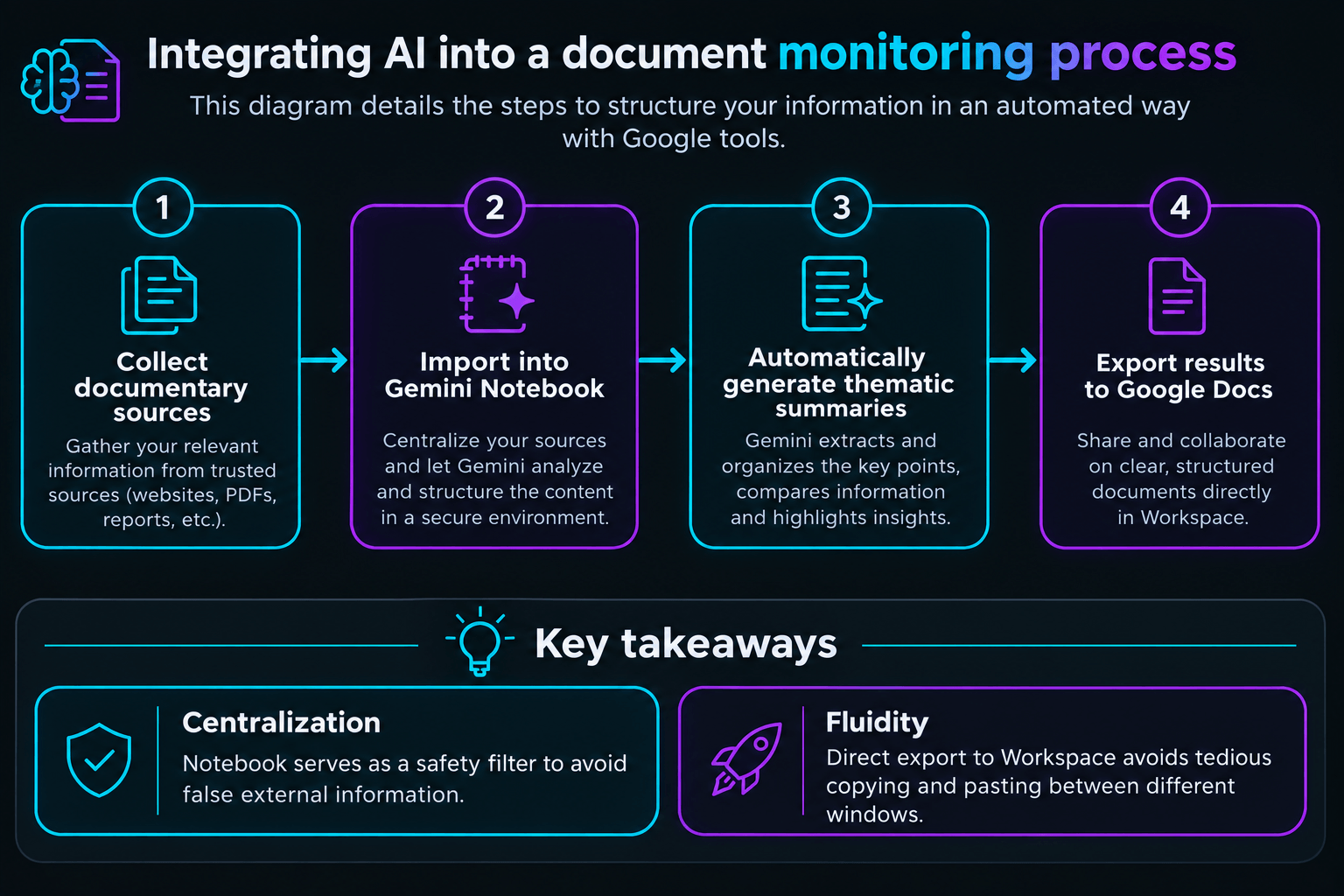
Key takeaways from this workflow
- Centralization: Notebook serves as a safety filter to avoid false external information.
- Fluidity: Direct export to Workspace avoids tedious copying and pasting between different windows.
Will the omnipresence of AI within our daily work tools end up standardizing the way we write and think, to the detriment of our own creativity?
Chargement de la galerie…

Creator of IActualité and a rigorous tech tester. With a keen analytical mind and surgical precision, I put AI tools through their paces to deliver practical guides and transparent, unfiltered verdicts. Passionate about Linux, robots, and pop culture!
L'intelligence artificielle, c'est comme un T-Rex dans un parc d'attractions : c'est fascinant à observer, mais il vaut mieux savoir exactement comment la clôture a été codée avant de s'en approcher.



0 Comments