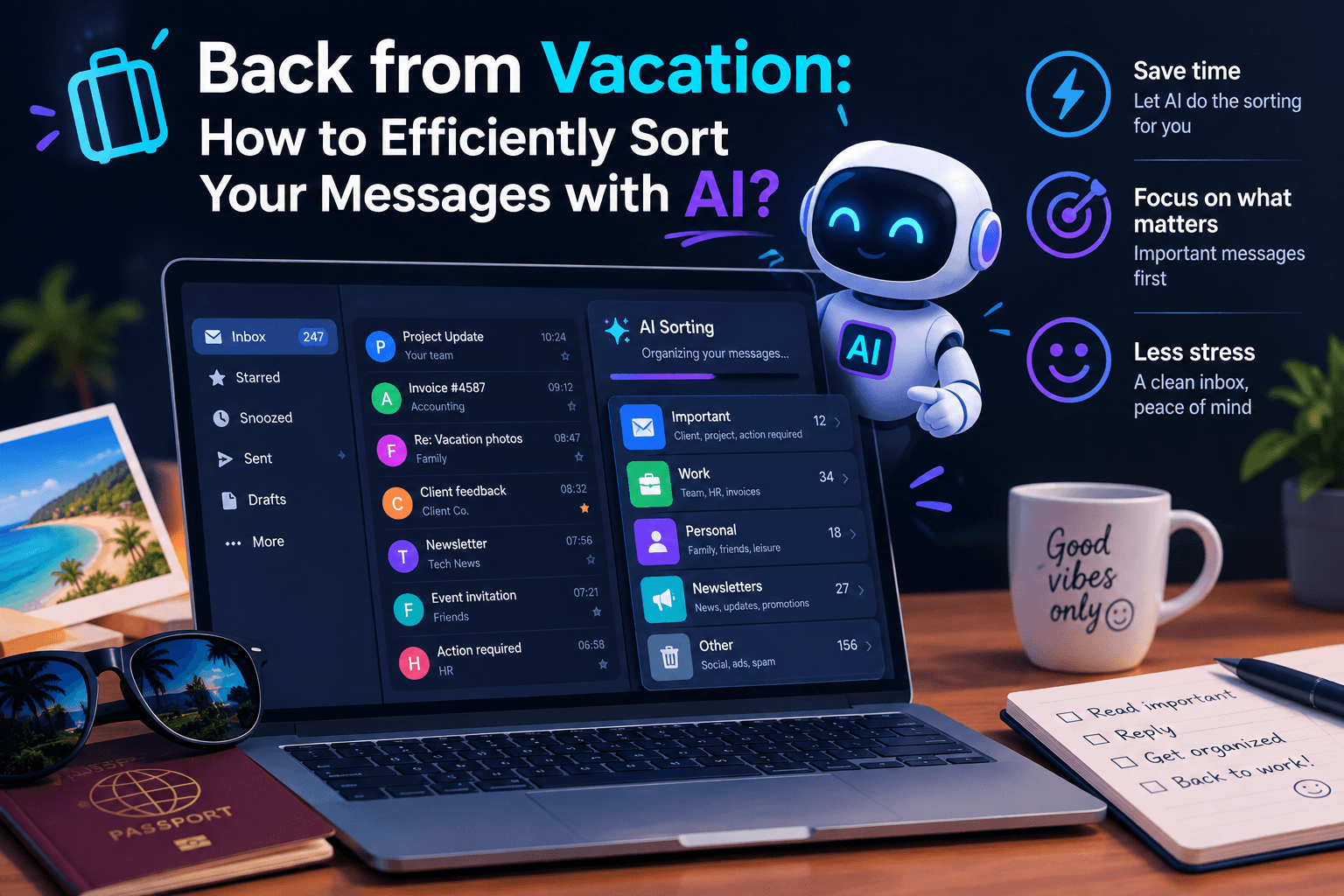

- Why sorting your emails with artificial intelligence is a game-changer
- Gmail and Gemini: putting automatic sorting efficiency to the test
- Activating and configuring Gemini in Gmail settings
- Microsoft Outlook and Copilot: toward smart and autonomous sorting
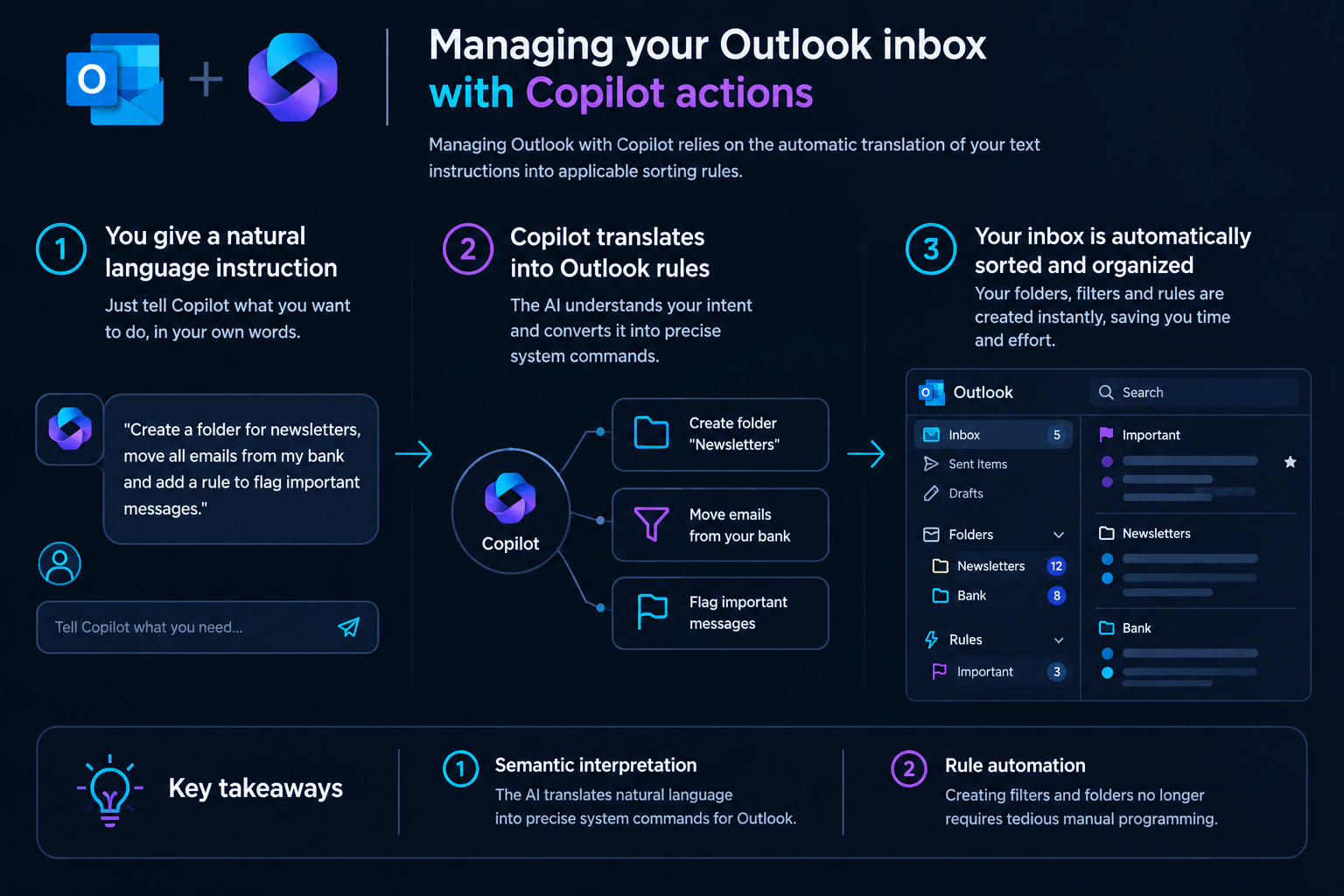
- Managing your Outlook inbox with Copilot actions
- Slack AI: taming the continuous flow of discussion channels
- The Slack AI daily summaries interface
- Technical comparison: which AI manages your messaging best?
- The concrete limits of AI automation
- Recommended Reading
🎙️ Tester's Verdict (Audio)
Listen to our final thoughts
Why sorting your emails with artificial intelligence is a game-changer
According to Gartner, 2024, integrating smart assistants reduces message processing time by more than half by targeting emergencies. Rather than browsing through each line chronologically, the user delegates the initial reading to a language model capable of identifying required actions. This method deeply alters our relationship with the inbox. According to McKinsey, 2024, processing emails consumes an average of 28% of a manager’s workweek. Automation offers a concrete alternative by classifying and summarizing streams. According to the Nielsen Norman Group, 2025, time savings amount to hours in the very first week for regular users. However, this delegation changes the interaction with our correspondents. A study by Folderly (2026) indicates that email open rates have climbed to 45.6% since the arrival of automatic summaries. On the other hand, click-through rates dropped from 4.35% to 3.93%. Users now settle for reading the summaries generated by the assistant without ever opening the original message.
💡 Our Tech Analysis:
The decoupling of email opening from actual reading marks a major shift in corporate information exchange. Drawing on the drop in click-through rates to 3.93% observed by Folderly, the analysis reveals a paradox: employees save time but lose the nuanced context of the matters at hand, effectively outsourcing their attention to an algorithmic filter. Over time, this phenomenon risks creating a sterile closed loop where assistants draft messages that other assistants summarize, stripping communication of its substance. For organizations, the true value add will soon lie not in the ability to summarize, but in the capacity to craft ultra-targeted messages capable of overcoming this barrier of abstraction.
Gmail and Gemini: putting automatic sorting efficiency to the test
Gmail integrates the Gemini AI to condense your long discussion threads and suggest personalized draft replies. This feature is activated via general settings and avoids reading dozens of successive replies. The tool extracts key points at the top of the screen for immediate time savings.
Automatic thread summary
Thread summarization in Gmail condenses high-volume exchanges into a synthetic bulleted list placed directly above the messages. The system is particularly adept at synthesizing long planning exchanges. I tested the tool on a thread containing 18 replies regarding the organization of a seminar. In three seconds, the overview displayed the selected dates, the approved budget, and the tasks assigned to everyone. However, its precision can drop on specific queries; some users on the r/google subreddit have reported that the assistant struggles to properly compile and extract numerical data from receipts, sometimes missing files or displaying wrong totals. Access to these options varies by geographic area. Summaries are free for everyone, but European users must manually activate smart features in their settings. As for advanced conversational search, it remains reserved for paid Google AI Pro subscribers.
Writing assistance and the case of Claude
The writing assistance feature generates complete emails from simple instructions, complemented by the external integration of Anthropic’s Claude. The assistant writes a draft from a quick prompt, while adjusting the tone according to your preferences. Full access to this option depends on your account type. Another highly effective use case is using Claude’s Google Workspace connector. Anthropic’s assistant can now send, reply to, and forward messages directly without opening the Gmail interface. I tested this integration to write a client follow-up. While the draft generation works well, we must keep in mind some layout bugs reported by G Suite users on Reddit, who noted that Gemini sometimes embarrassingly appends both the corrected version and the original email side-by-side in the sent message. In my test, however, mandatory prior validation ensures security and lets you review the formatting before each send.
Activating and configuring Gemini in Gmail settings
To enjoy Gemini in Gmail, you must activate smart features in the General tab of your settings.
Key configuration points
- Smart features: This option allows the semantic analysis of your messages by Google’s algorithms.
- Automatic preview: Once activated, the Gemini box appears on its own above discussion threads with more than three messages.
Microsoft Outlook and Copilot: toward smart and autonomous sorting
Microsoft Outlook uses Copilot to analyze your messages in the background and execute complex administrative tasks. This major integration offers fine semantic understanding capable of spotting implicit requests in your professional messages. The assistant no longer just summarizes; it proposes concrete actions.
Quick synthesis with GPT-5.6 models
Copilot’s GPT-5.6 model instantly extracts key information from your bulky emails and their attachments. The July 2026 update, documented by the Microsoft Tech Community (2026), introduces these highly advanced autonomous action capabilities. The assistant now processes large volumes of information with increased speed.
Action automation with ‘Allow Actions’
The ‘Allow Actions’ feature allows Copilot to create folders and organize your messages with a simple voice or text command. Copilot can create folders, categorize emails, or set up your out-of-office message with a simple prompt. In practice, the difference with older versions is striking. I asked Copilot to file all messages concerning an ongoing project into a dedicated folder. The assistant created the folder, moved 14 messages, and suggested three open slots in my calendar in less than a minute. Yet, this automation is not without flaws; some users sharing their experiences on the r/microsoft_365_copilot community have noted that the assistant can suggest meeting times that are actually already occupied, or fail to find emails due to Outlook’s search limitations.
Managing your Outlook inbox with Copilot actions
Managing Outlook with Copilot relies on the automatic translation of your text instructions into applicable sorting rules.
Key takeaways from this process
- Semantic interpretation: The AI translates natural language into precise system commands for Outlook.
- Rule automation: Creating filters and folders no longer requires tedious manual programming.
Slack AI: taming the continuous flow of discussion channels
Slack AI offers automated summaries of your channels and semantic search to quickly find past decisions. The assistant extracts key decisions, important mentions, and required actions within your discussion spaces. This feature avoids having to scroll through hundreds of messages after a long absence.
Morning ‘Recaps’ for muted channels
Slack’s ‘Recaps’ generate a condensed summary each morning of the discussion channels you have chosen to mute. Slack offers this automatic summary for selected channels. I configured this system on four project channels that were active during my vacation. The result is particularly clean: the AI provided me with a structured summary of missed milestones and decisions made. However, the business model of this solution remains restrictive. During our evaluation of these tools, we noted that many administrators on Reddit communities dedicated to Slack find the pricing hard to justify, especially since the company retired its standalone $10 add-on to bundle advanced AI features into the Business+ plan at $15 per month. Furthermore, the relevance of the summaries depends on the quality of the exchanges within your team.
Semantic information search
Slack AI’s semantic search allows you to ask questions in natural language to get a synthesized answer from your files and conversations. The user queries the tool directly from the search bar. The assistant analyzes the complete history to extract the precise answer, while citing its sources to allow you to verify the information.
The Slack AI daily summaries interface
The Slack AI interface presents summaries in the form of thematic key points linked directly to the original messages.
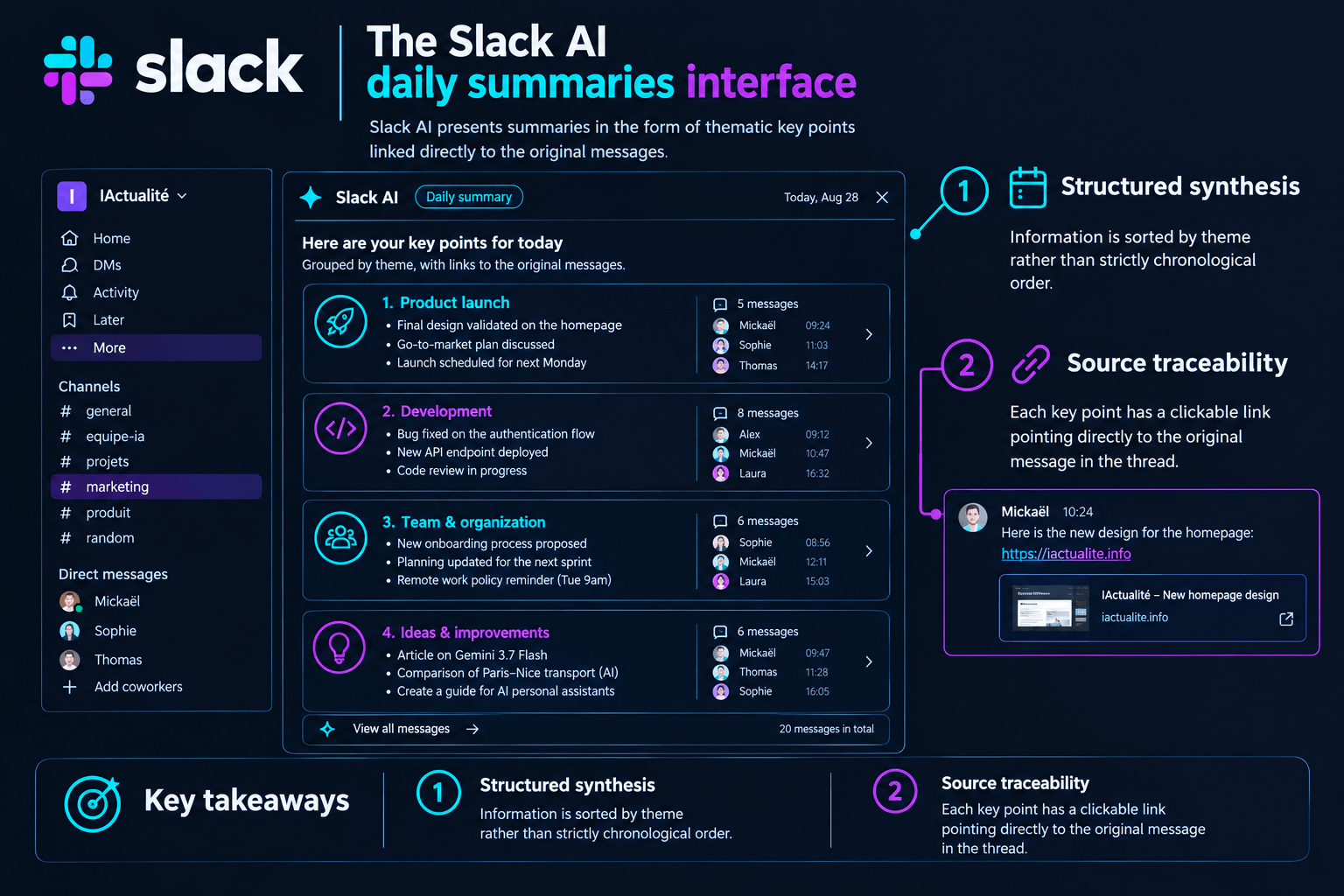
Key interface points
- Structured synthesis: Information is sorted by theme rather than strictly chronological order.
- Source traceability: Each key point has a clickable link pointing directly to the original message in the thread.
Technical comparison: which AI manages your messaging best?
Your choice of AI assistant mainly depends on your primary email software and your subscription budget. While Google favors free access to basic summary functions, Microsoft relies on deep integration and paid autonomous actions. Slack positions itself as the king of instant conversation synthesis for collaborative teams.
| Criterion | Gmail (Gemini) | Outlook (Copilot) | Slack AI |
|---|---|---|---|
| Summary function | Free (with manual opt-in in Europe) | Included in M365 pro plans | Paid pay-per-user option |
| Autonomous actions | Limited to drafting replies | Creation of rules, folders, calendar | Integration of automated workflows |
| Underlying model | Gemini 1.5 / Gemini 3.5 Flash | OpenAI GPT-5.6 / Claude Sonnet | Optimized proprietary models |
| Semantic search | Paid (Google AI Pro/Ultra) | Included for all pro accounts | Included in the paid add-on |
The concrete limits of AI automation
The major limits lie in the lack of understanding of sarcasm and the tendency of semantic filters to hide important emails. Wanting to sort your emails with artificial intelligence, however, presents technical limits that must be anticipated. Algorithms still struggle to grasp nuance, irony, or implicit urgency in a professional message. The multiplication of semantic filters poses a visibility problem. According to the study by Folderly (2026), nearly 40% of emails that reach the main Gmail inbox end up downgraded or hidden by the AI’s automatic analysis. This invisible selection can make you miss a business opportunity if the algorithm deems the content too generic. The cumulative cost of these tools also represents a significant investment for freelancers and SMEs. The accumulation of subscriptions to Copilot, Google AI, and Slack AI weighs heavily on the monthly IT budget.
Chargement de la galerie…



Creator of IActualité and a rigorous tech tester. With a keen analytical mind and surgical precision, I put AI tools through their paces to deliver practical guides and transparent, unfiltered verdicts. Passionate about Linux, robots, and pop culture!
L'intelligence artificielle, c'est comme un T-Rex dans un parc d'attractions : c'est fascinant à observer, mais il vaut mieux savoir exactement comment la clôture a été codée avant de s'en approcher.



0 Comments