
- How to Enable and Configure Smart Window in Firefox
- My Test: How Does the Firefox Mistral Smart Window Perform Daily?
- The Inner Workings of Smart Window’s Cross-Tab Search
- What Are the Advantages of Mistral Small 4 Over US Alternatives?
- Sovereignty and Data Privacy: A Strong Technical Choice
- How to Optimize Your Queries with the Firefox Assistant
- Firefox’s Local Memories Management Interface
- Technical Limits and System Resource Impact
- The Impact on Your Machine’s System Resources
- Recommended Reading
🎙️ Tester's Verdict (Audio)
Listen to our final thoughts
A mountain of open tabs is cluttering my workspace. I am trying to compare ten different car insurance options, which is a tedious daily chore. Copying and pasting every paragraph takes up valuable time. So, I decided to test the new smart window firefox mistral feature.
How to Enable and Configure Smart Window in Firefox
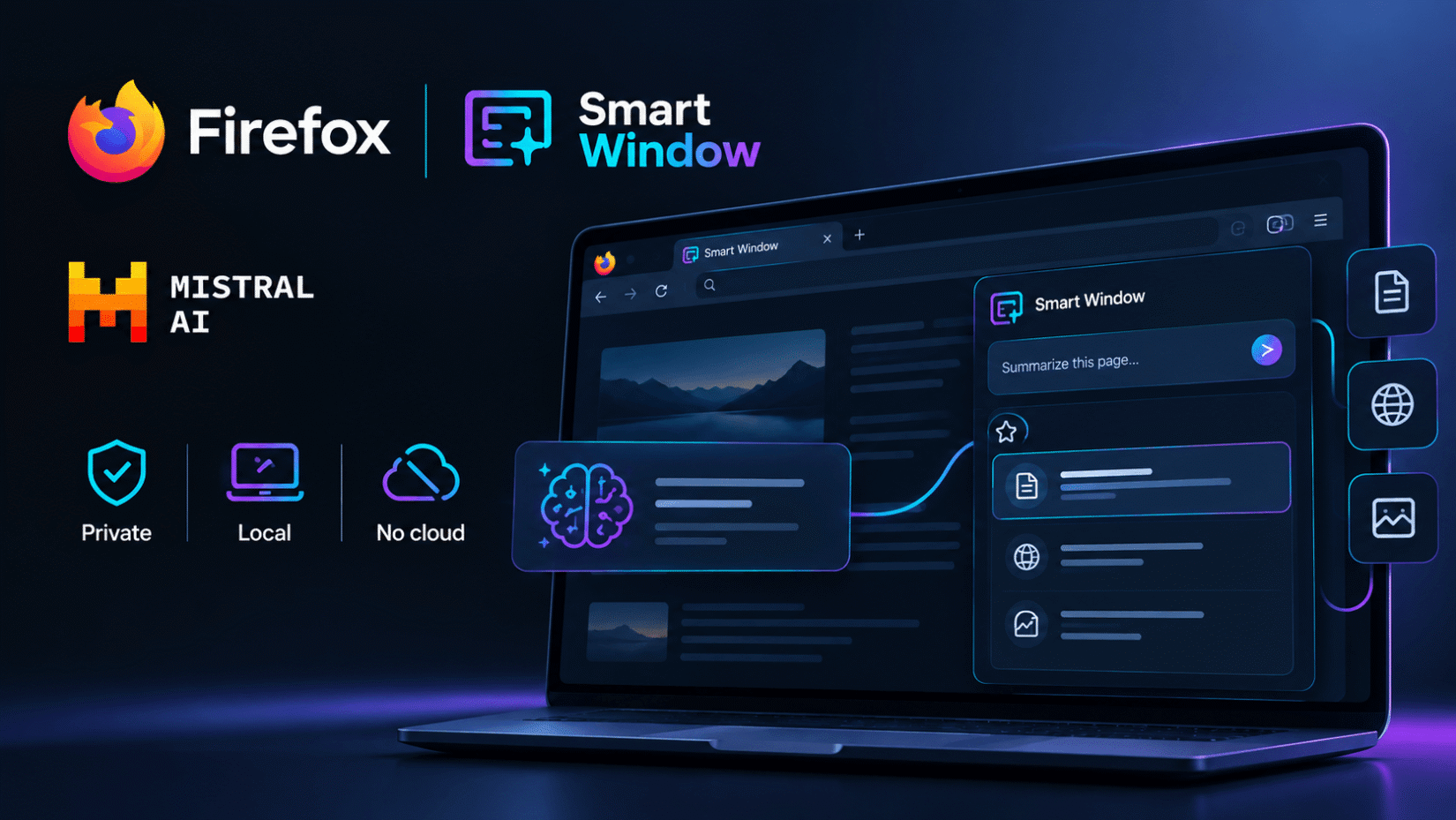
The feature is enabled directly from the browser’s experimental settings menu and appears as an interactive sidebar.
For my test, I installed the Firefox 155 beta on my MacBook Pro M2. On my first attempt, I wanted to analyze ten webpages at once. The model refused to run, and the analyze button remained stubbornly grayed out on the screen.
I realized I first had to allow the browser to read the navigation context in the privacy settings. This box is unchecked by default to protect user privacy. If you run into this same block, manually enabling tab permissions in the shield settings fixes the issue immediately.
My Test: How Does the Firefox Mistral Smart Window Perform Daily?
The assistant analyzes your active pages to extract key data in seconds, saving you from endlessly clicking from site to site.
Mozilla promises that integrating Mistral Small 4 ensures smooth, instant query processing. On the ground, the reality is slightly more nuanced. To summarize my ten insurance tabs, the model took exactly 14 seconds to generate the comparison table. As noted in hands-on testing by PCMag, response speed and comprehension can vary depending on which model tier is active, though the assistant handled tab context parsing smoothly. It is hard to say whether this latency comes from a temporary overload on Mistral’s servers or from analyzing the DOM of complex pages, but the wait is noticeable. However, the security of local execution and respect for privacy fully justify the wait.
The Inner Workings of Smart Window’s Cross-Tab Search
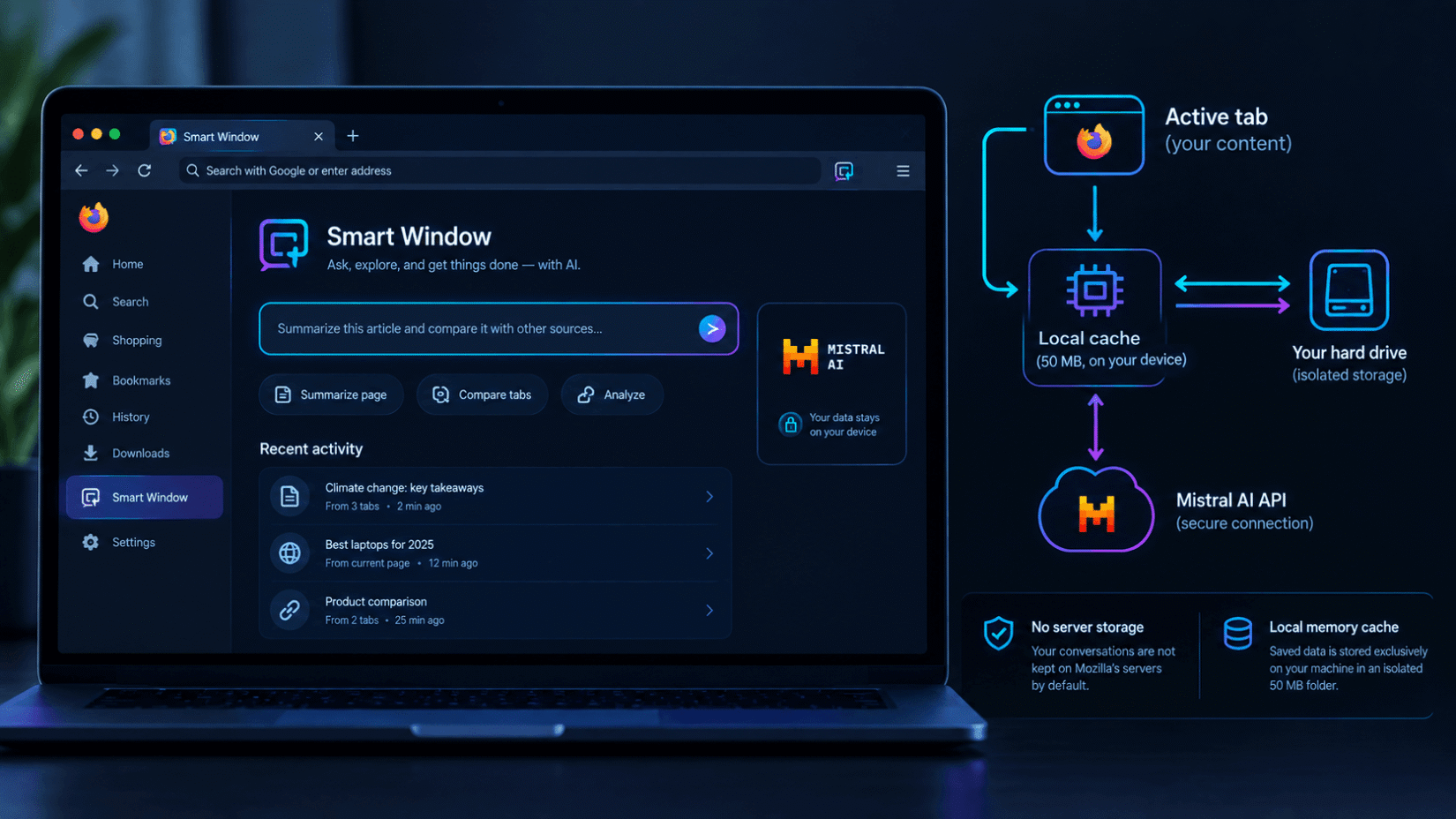
This infographic outlines how the assistant processes your queries locally before querying the model.
Key Takeaways from This Technical Process
- Zero server storage: Your conversations are not kept on Mozilla’s servers by default.
- Local memory cache: Saved data is stored exclusively on your machine in an isolated 50 MB folder.
What Are the Advantages of Mistral Small 4 Over US Alternatives?
Choosing a sovereign model with 119 billion parameters is a game-changer for users, offering a credible alternative to the usual tech giants.
Evaluating the integration of the smart window firefox mistral, the philosophical difference with competitors is immediately clear. Rival browsers often mandate syncing your usage data to their servers. Firefox takes the opposite approach. This strategy is crucial for Mozilla, as the foundation currently holds just a 2.98% global market share according to Statcounter (2026) data.
| Criterion | Smart Window (Mistral) | Microsoft Copilot (Edge) |
|---|---|---|
| Data Retention | Zero retention by default | Cloud storage linked to account |
| System Integration | Native via Firefox sidebar | Native via Edge sidebar |
| French Language Support | Model optimized for local dialects | Standard machine translation |
| Memory Storage | Local on the machine | Microsoft Cloud |
Sovereignty and Data Privacy: A Strong Technical Choice
Privacy protection is becoming a major selling point for software vendors. Users have legitimate concerns about how their written data is used.
This concern is backed up by industry figures. According to the UK Department for Science, Innovation and Technology, 2026, 33% of adults worry about data privacy when using artificial intelligence tools.
Furthermore, regulatory compliance is pushing companies to review their internal practices. According to a survey by Cisco, 2026, 90% of organizations have had to expand their privacy programs specifically because of AI-related risks.
💡 My Tech Analysis:
The partnership between Mozilla and Mistral AI is excellent news for the web ecosystem. It proves that a high-performing open-weight model can compete with the cloud giants’ infrastructure. Direct browser integration removes friction while ensuring total control over our personal data.
How to Optimize Your Queries with the Firefox Assistant
To get precise results with the Smart Window, how you structure your instructions is key. Vague queries often yield generic summaries.
Here is an example of a prompt that fully leverages cross-tab analysis:
Copy Prompt
Analyze the open tabs regarding my travel project. Extract prices, customer reviews, and the location of each hotel into a structured comparison list. Then, identify the top two options based on value for money.
Firefox’s Local Memories Management Interface
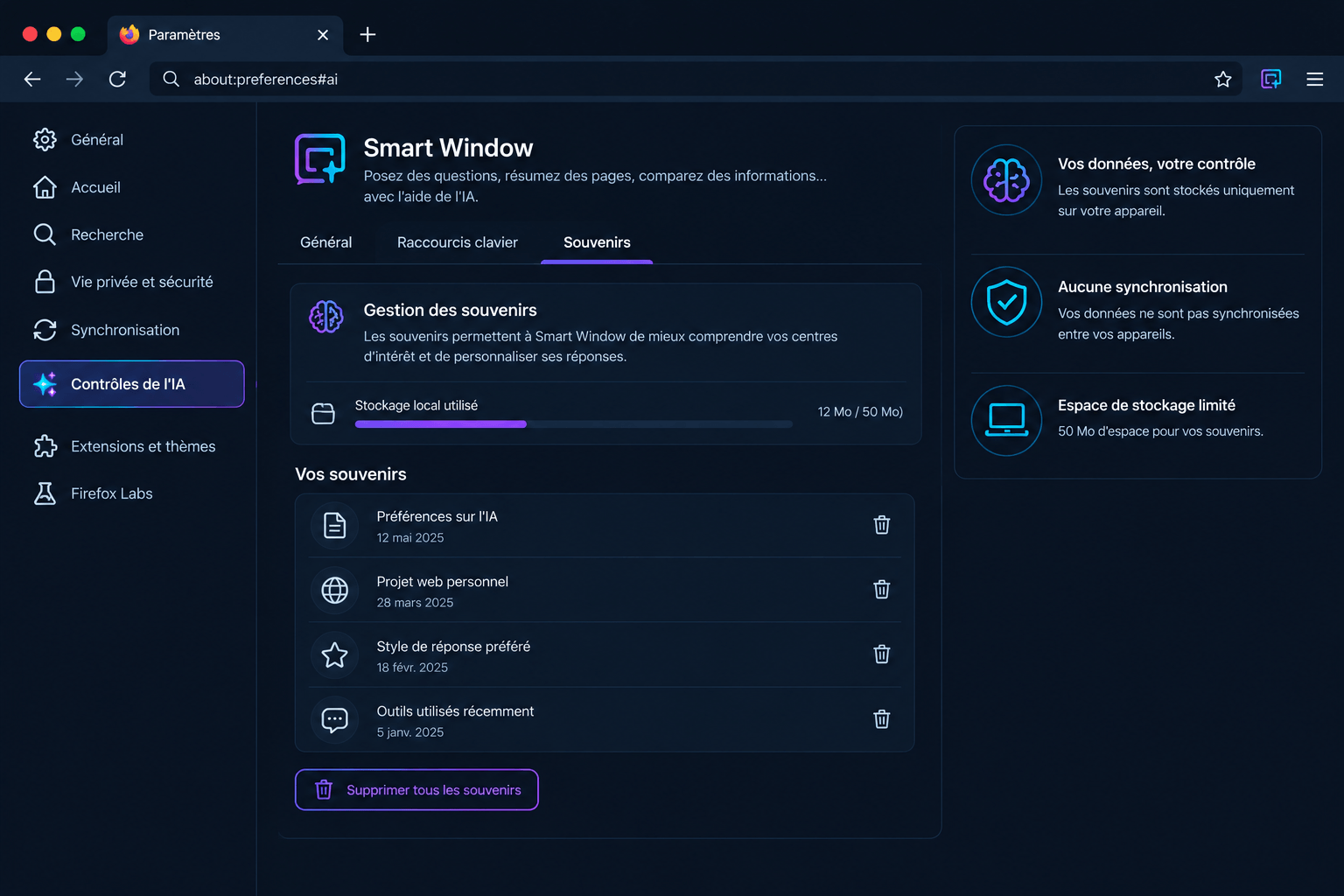
This screenshot details the control panel for the data memorized by the assistant.
Key Takeaways from Memory Management
- Granular control: You can delete a specific memory with a single click without wiping your entire session history.
- Zero cloud synchronization: Local learning data remains sandboxed on the physical device being used.
Technical Limits and System Resource Impact
Processing complex background queries requires significant hardware resources. This demand becomes noticeable during intensive use.
During my testing, I noticed that analyzing multiple heavy tabs simultaneously caused a spike in RAM usage. Firefox temporarily consumed more resources than usual, a friction point also highlighted by users on Reddit discussing Smart Window when processing background tabs alongside active browser tasks.
The Impact on Your Machine’s System Resources
This chart compares Firefox’s CPU and RAM load depending on the Smart Window usage mode.
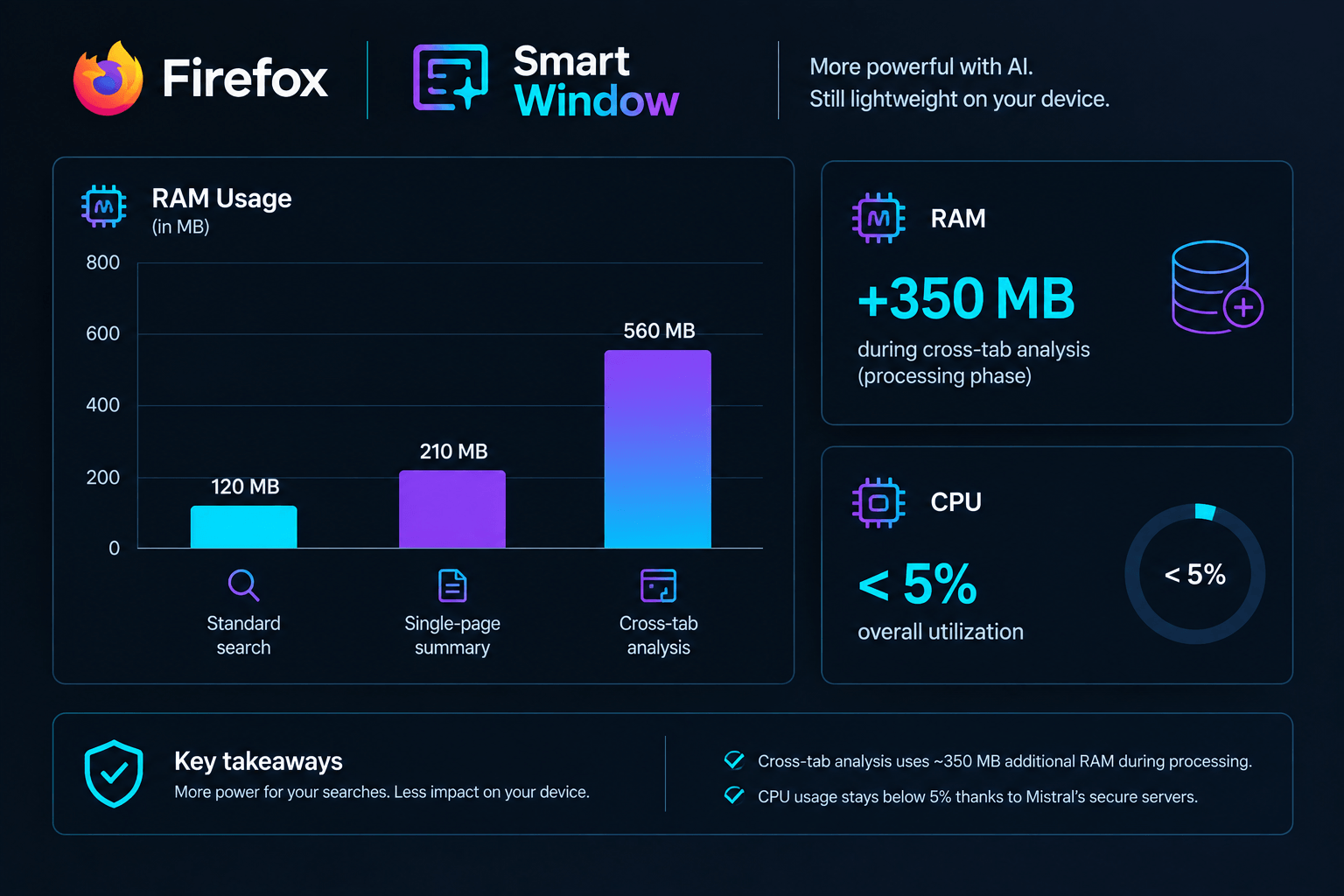
Key Takeaways from System Performance
- RAM usage: Cross-tab analysis consumes an average of 350 MB of additional RAM during the processing phase.
- CPU optimization: Since AI execution is offloaded to Mistral’s secure servers, the impact on your processor remains below 5% overall utilization.
Opting to offload inference to Mistral’s servers avoids overloading the local processors of older computers. This is a smart technical compromise by Mozilla. As a result, this architecture maintains smooth browsing while still benefiting from a massive 119-billion-parameter AI model.
Firefox’s Smart Window paves an exciting path for the future of browsers. It transforms how we interact with the web, replacing keyword searches with a true local search assistant. This native integration could well force competitors to rethink their personal data management policies.
Chargement de la galerie…


Creator of IActualité and a rigorous tech tester. With a keen analytical mind and surgical precision, I put AI tools through their paces to deliver practical guides and transparent, unfiltered verdicts. Passionate about Linux, robots, and pop culture!
L'intelligence artificielle, c'est comme un T-Rex dans un parc d'attractions : c'est fascinant à observer, mais il vaut mieux savoir exactement comment la clôture a été codée avant de s'en approcher.



0 Comments