

- Environment generation and real-time control with Google Genie 4
- Visual characteristics and control features
- Gemini architecture and native sound: the end of passive videos
- Concrete limits: physics, visual drift, and object permanence
- Tracking physical failures and memory loss
- Real use cases: from robotics to video game prototyping
- Organization of the virtual prototyping workflow
- My assessment on the future of AI simulation engines
🎙️ Tester's Verdict (Audio)
Listen to our final thoughts
A simple press of an arrow key on your keyboard moves your character through a foggy alleyway, while you type a text prompt to trigger a torrential downpour. The universe reacts instantly: puddles form on the ground reflecting the scene, and the crash of thunder echoes in your headphones. My field test of Genie 4 reveals the inner workings of this model capable of building an interactive world pixel by pixel.
Environment generation and real-time control with Google Genie 4
Google Genie 4 allows you to explore a 3D virtual universe computed frame by frame while modifying it on the fly using keyboard controls and text prompts.
Opening the Project Genie tech demo in a Chrome browser with developer access, the experience contrasts sharply with traditional video generation. It is no longer about watching a pre-rendered clip. You are piloting a viewpoint within a responsive environment. Pressing the Z key moves the camera forward into the scene. If you edit the written prompt to add an obstacle, the image reconstructs the background without interrupting navigation.
To alter the mood and physics of a scene while it is running, here is the type of prompt we submitted to the system during our tests:
Prompt to copy
Change the alley lighting to nightfall under rain, add heavy fog at the end of the corridor, and make the sound of distant thunder echo.
Integrating direct text entry lets you transform the background without having to restart a full rendering process from scratch. This responsiveness enables a new workflow for designing interactive environments without going through traditional 3D modeling.
Visual characteristics and control features
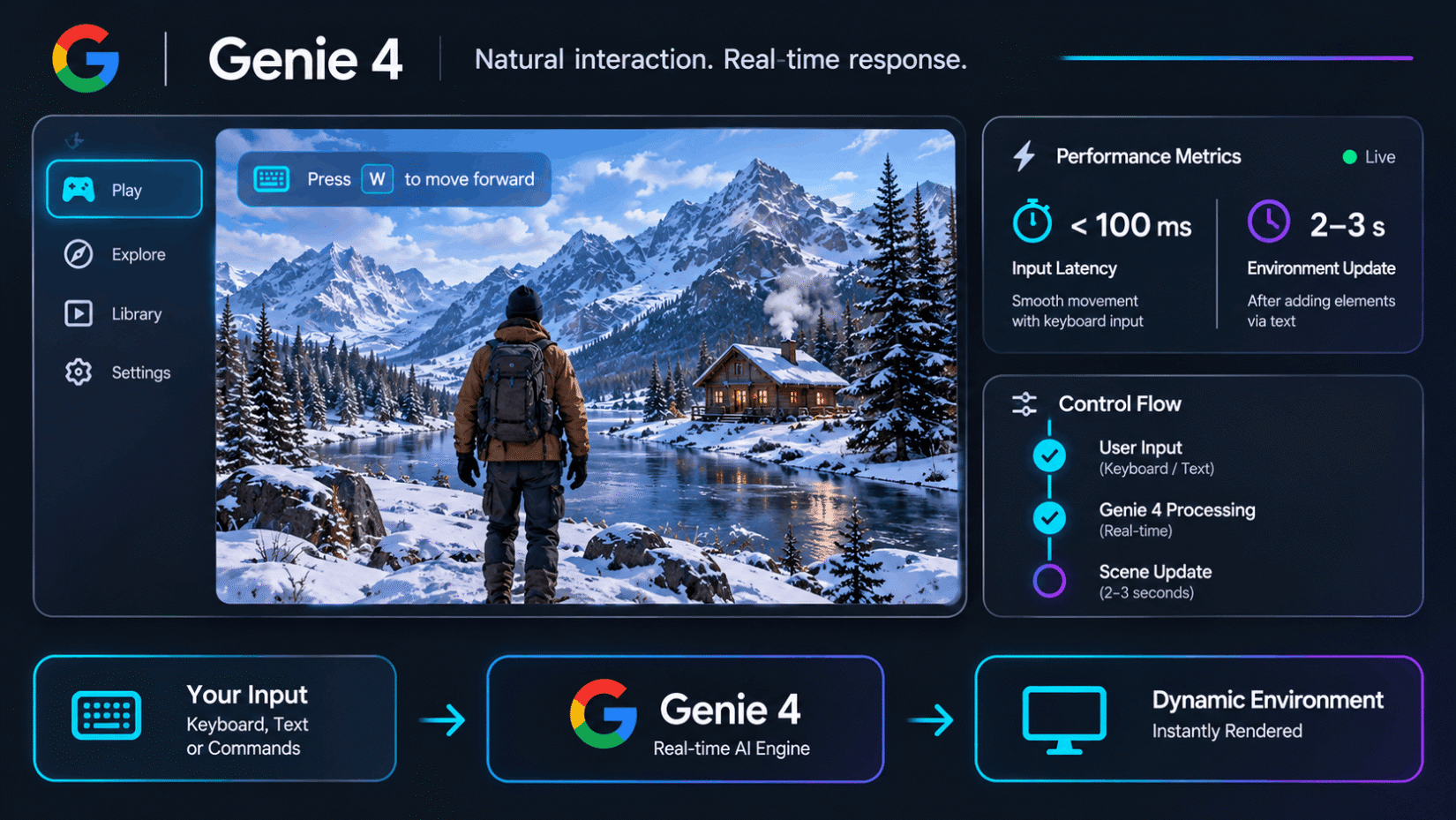
The infographic below details the layout of control flows between user inputs and the screen rendering.
Key takeaways from this data
- Display latency: Keyboard inputs respond in less than 100 milliseconds in our test session, delivering smooth movement.
- Environment adjustment time: Adding a new element via text requires a 2 to 3 second wait before the scene stabilizes visually.
Gemini architecture and native sound: the end of passive videos
The system pairs the Gemini Omni model for visual rendering with Gemini 3.8 Flash as a planner (the AI component responsible for ordering the logical sequence of events) to maintain scene consistency and generate synchronized audio.
The major innovation lies in this division of roles. Gemini Omni generates the graphic elements, while Gemini 3.8 Flash checks each rendered frame to ensure a wall doesn’t abruptly disappear when the camera pans. Audio is no longer a soundtrack added afterwards: footsteps, voice resonance, and ambient effects are computed directly alongside the visual rendering.
Compared to previous generations of world models (computing systems capable of representing and predicting the physical reactions of an environment), the technical progress is measurable, as shown in this comparison:
| Performance metric | Genie 3 (2025) | Genie 4 (2026) |
|---|---|---|
| Visual consistency memory | 1 minute maximum | Up to 2 consecutive minutes |
| Audio generation | None (silent visual rendering) | Native audio (ambiance, voices, sound) |
| Scenario control | Direct generation without control | Built-in Gemini 3.8 Flash planner |
| Physics modeling | Simplified collisions | Enhanced aerodynamics and contacts |
Data documented by Google DeepMind (2025) for Genie 3 showed a visual memory limit capped at 60 seconds in 720p resolution. According to measurements by Digital Trends (2026), access to Genie 4 doubles this scene retention capacity while integrating spatialized audio.
Concrete limits: physics, visual drift, and object permanence
Despite its advances, the simulation shows weaknesses with complex physical laws and starts losing track of objects after two minutes of continuous interaction.
During an attempt to add a snowstorm in the middle of an obstacle course, my character froze for four seconds, and ground textures flashed briefly before the model stabilized the display. Google promises immediate environmental adaptation; in practice, my tests confirm the responsiveness of directional inputs, but reveal stuttering whenever multiple complex modification requests are combined.
Object permanence-the system’s ability to remember that an object still exists when it moves out of the camera’s field of view-remains the weakest link. If you leave a car at a street corner, walk two hundred meters, and then turn around, the vehicle has often changed color or model. It is hard to tell whether this alteration comes from memory buffer saturation or hesitation by the Gemini 3.8 Flash planner, but the loss of visual fidelity is clearly measurable over time.
If you notice flickering textures when adding an element to the scene, resubmit the command while specifying the exact position of the light source to force the model to compute stable shadows.
Tracking physical failures and memory loss
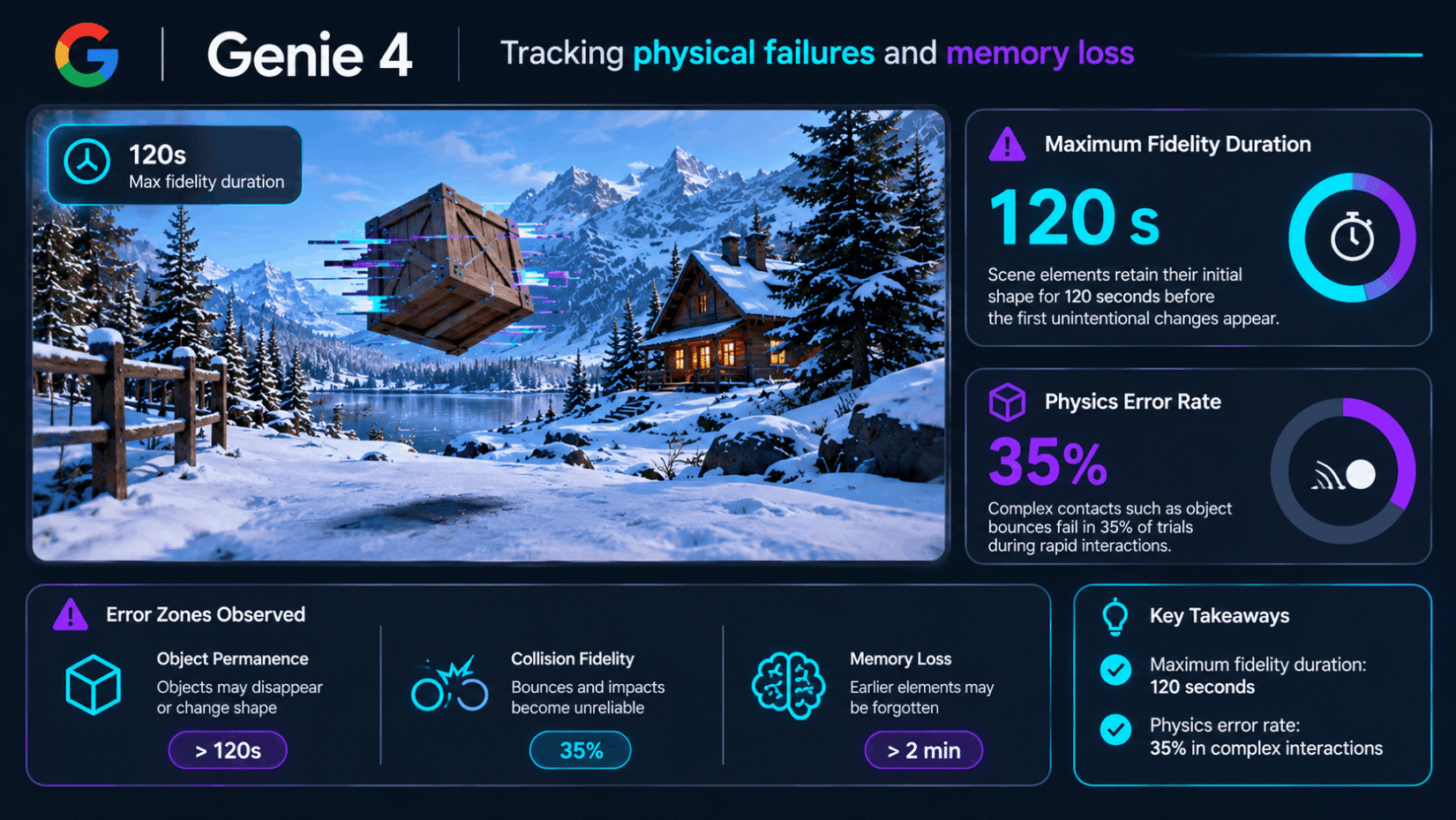
The diagram below summarizes the error zones observed during extended testing phases.
Key takeaways from this data
- Maximum fidelity duration: Scene elements retain their initial shape for 120 seconds before the first unintentional changes appear.
- Physics error rate: Complex contacts such as object bounces fail in 35% of trials during rapid interactions.
💡 My Tech Analysis:
Genie 4 does not replace a traditional 3D engine like Unreal Engine or Unity. Its value does not lie in vector rendering precision, but in its ability to generate a complete interactive world from simple text prompts. For creators, it is an unmatched conceptual exploration tool, provided they work within a still very short scene lifespan.
Real use cases: from robotics to video game prototyping
Genie 4 serves as a virtual testbed to train autonomous agents and allows creators to test interactive environment concepts without coding a 3D engine.
The most promising application involves robot training. Instead of building expensive physical sets to teach an articulated arm how to grasp objects, engineers generate thousands of scenarios inside the simulator. As noted in the HyperAI (2026) analysis, researchers use these virtual environments to expose algorithms to lighting variations and obstacles prior to any hardware deployment.
In film and video games, the technology simplifies the previsualization phase. A director can explore a virtual set, adjust the weather by voice, and validate camera angles before live shooting begins. Every generated file automatically includes the SynthID watermark (an invisible digital tag embedded by Google in media to certify its synthetic origin).
Organization of the virtual prototyping workflow
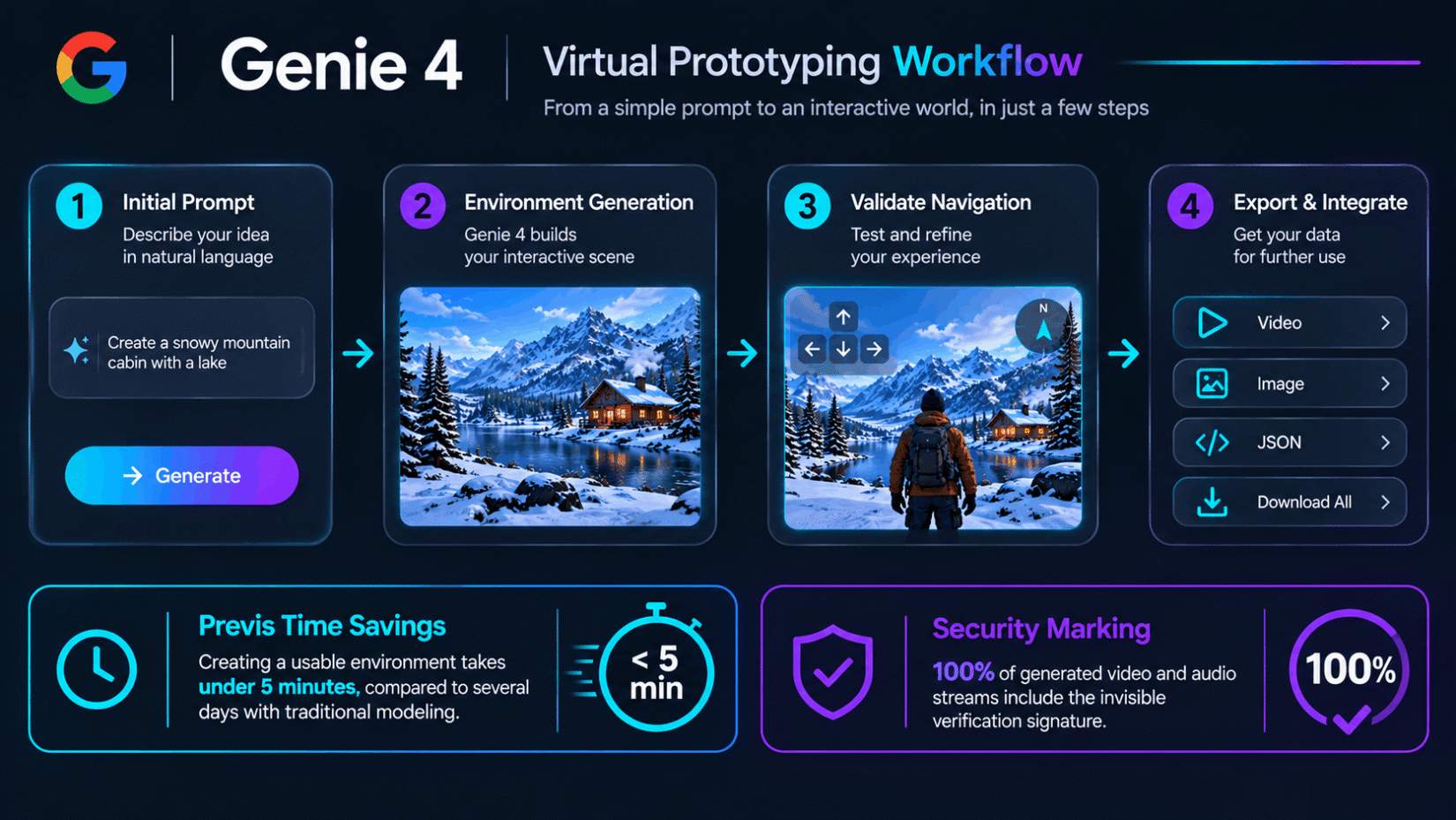
The diagram below illustrates the integration of Genie 4 into an interactive project design pipeline.
Key takeaways from this data
- Previs time savings: Creating a usable environment takes under 5 minutes, compared to several days with traditional modeling.
- Security marking: 100% of generated video and audio streams include the invisible verification signature.
My assessment on the future of AI simulation engines
Genie 4 provides a foundation for interactive software, but it remains a previsualization tool rather than a replacement for traditional 3D engines.
The ability to produce interactive content on the fly is a clear step forward from generating static video. However, current limits regarding object memory and physical stability show that the technology is still in an experimental stage. The gradual rollout of access for Google AI Ultra subscribers and via the Gemini API will help measure the model’s viability for daily workflows.
This shift toward on-demand calculated environments blurs the line between game engines and media generators. In the future, user interfaces may no longer load pre-existing 3D files, but maintain an ongoing dialogue with systems that convert text into explorable spaces.
Chargement de la galerie…

Creator of IActualité and a rigorous tech tester. With a keen analytical mind and surgical precision, I put AI tools through their paces to deliver practical guides and transparent, unfiltered verdicts. Passionate about Linux, robots, and pop culture!
L'intelligence artificielle, c'est comme un T-Rex dans un parc d'attractions : c'est fascinant à observer, mais il vaut mieux savoir exactement comment la clôture a été codée avant de s'en approcher.



0 Comments