- In Brief: The Essentials of Midjourney
- ⚡ Performance & Limits
- 🧪 Concrete Example: Input vs Output
- 🎯 Is this tool REALLY for you?
- 🤝 Community & Support
- Key Features
- Who is Midjourney for?
- Use Case: Creating a Branded Social Media Campaign Visual with Midjourney and Photoshop
- 🟣 PROMPT TEMPLATES FOR MIDJOURNEY
- Pricing & Plans
- Pro Tips
- ⚠️ Crash Test & Limitations
- What other users are saying
- ⚙️ The Ideal Workflow
- Our Review of Midjourney
- 🔗 Integrations & API
- Security & Privacy
- Frequently Asked Questions (FAQ)
- Alternatives Comparison
- Take action: try Midjourney today!
- Top 3 Alternatives to Midjourney
🎙️ Tester's Verdict (Audio)
Listen to our final thoughts
In Brief: The Essentials of Midjourney
In the realm of AI-powered creative tools, the promise of effortless, high-fidelity image generation often rings hollow, drowning users in generic outputs and endless re-rolls. We, at IActualité, approached Midjourney with a healthy dose of skepticism, tasked with discerning if this tool truly transcends the marketing hype. Imagine a scenario where a boutique agency needs to rapidly prototype visual concepts for a new campaign – from abstract mood boards to photorealistic product mockups, all while maintaining a consistent aesthetic. Traditional methods would demand hours of stock photo searching, laborious Photoshop composites, or costly photoshohoots. Our mission was to push Midjourney to its limits in this exact context, evaluating its ability to deliver speed, quality, and creative control without compromising on originality, thereby addressing a critical bottleneck in modern visual production workflows.
⚡ Performance & Limits
- Learning Curve: Estimated time for basic proficiency: 2-4 hours; Estimated time for advanced mastery: 2-4 weeks of consistent practice, especially for prompt engineering and parameter understanding.
- Speed: Average generation speed for a 4-image grid in Fast mode is under 60 seconds, often around 30-45 seconds for standard jobs on V6.1, and roughly 25% faster for V6.1 compared to previous versions. V8 Alpha boasts approximately 5x faster generation than older models. In Relax mode, generations can take 1-5 minutes depending on server load.
- Free Limits: Midjourney no longer offers a permanent free plan or free trial as of late 2024. The cheapest way to start is the Basic tier at $10/month.
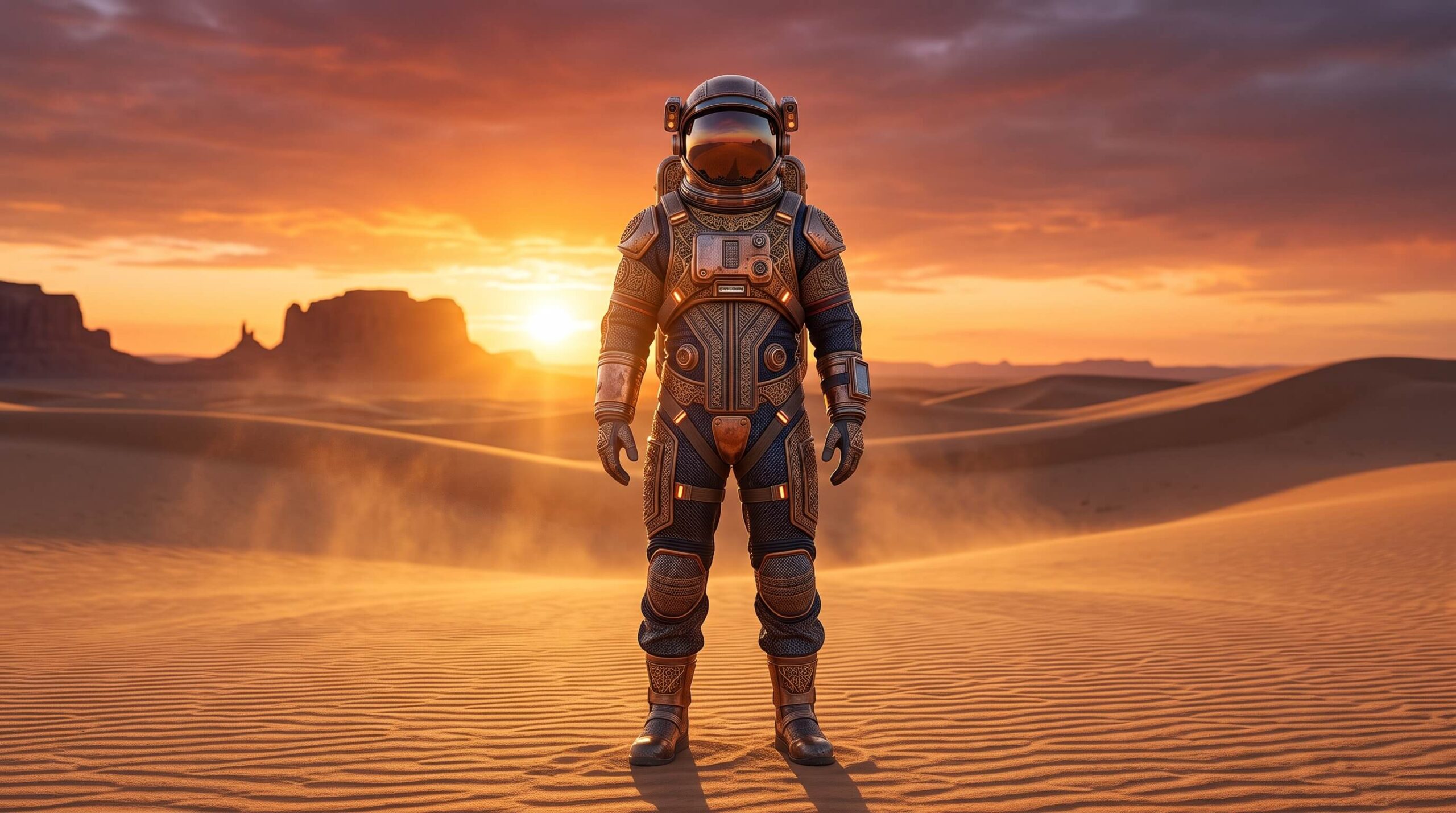
🧪 Concrete Example: Input vs Output
“/imagine prompt: A high-fashion editorial photograph of an astronaut in a detailed, ornate spacesuit, standing amidst a minimalist desert landscape at sunset, cinematic lighting, ultra-realistic, –ar 16:9 –v 8 –style raw”
🎯 Is this tool REALLY for you?
✅ YES, use it if:
- You are a professional artist, designer, or marketer needing high-quality, aesthetically rich visual concepts rapidly.
- You require advanced control over image style and character consistency across multiple generations.
- You prioritize artistic quality and photorealism in AI-generated imagery over absolute literal interpretation of complex scenes.
- You are prepared to invest in a paid subscription and understand the intricacies of prompt engineering to achieve specific results.
❌ NO, avoid it if:
- You expect a free-to-use tool for casual image generation or have a very limited budget for AI creative software.
- You need an AI that excels at complex scene coherence, precise text rendering for long sentences, or perfect anatomical accuracy without refinement.
- You require a fully integrated video generation platform, as Midjourney currently focuses solely on static images.
- You handle highly sensitive or confidential client data and cannot rely on a public-by-default platform without Stealth Mode (Pro plan and above).
🤝 Community & Support
Midjourney’s support and community are overwhelmingly centered on its Discord server. This vibrant, active community is both a strength and a potential weakness. On the one hand, users benefit from real-time peer support, prompt-crafting forums, and dedicated ‘newbies’ channels where moderators and experienced ‘Guides’ offer assistance. Weekly ‘office hours’ with updates also foster engagement. On the other hand, relying solely on Discord for support can feel unstructured and overwhelming for users accustomed to traditional ticketing systems or dedicated email support. While an FAQ and documentation exist on their website, the interactive and problem-solving aspects are predominantly community-driven, meaning direct, one-on-one technical support can be less accessible than with other platforms. The sheer scale of the community (over 21 million members by May 2025) suggests an active, self-serving ecosystem.
Key Features
- Advanced Prompt Understanding (V6/V8)With recent iterations, notably V6 and V8 Alpha, Midjourney has significantly improved its comprehension of natural language prompts. This means users no longer need to rely as heavily on specific ‘keyword’ jargon like ‘4k’ or camera models; instead, it responds better to descriptive, conversational language. The model can now interpret longer, more complex inputs and generate images that align more precisely with intricate descriptions, allowing for greater creative control over composition, object placement, and scene details. This enhanced understanding enables nuanced storytelling within a single prompt, reducing the need for extensive post-processing or multiple re-rolls to achieve a desired concept.
- Photorealism and Aesthetic QualityMidjourney continues to set the benchmark for photorealistic and aesthetically pleasing outputs. The latest models, V6.1 and V8, produce images that are incredibly difficult to distinguish from real photographs, with exceptional detail in textures, skin, lighting, and environmental rendering. This isn’t just about ‘realism’ but also about a distinctive ‘filmic’ or ‘painterly’ bias that lends a professional, art-directed polish to generated visuals, even without explicit stylistic instructions. This inherent artistic ‘opinion’ saves significant time in achieving visually stunning results, making it ideal for concept art, editorial illustrations, and visual development.
- In-Image Text Generation (V6+)A long-awaited and crucial feature, Midjourney V6 and later versions introduced the capability to generate legible text directly within images. While still not perfect for long sentences or complex typography, it performs remarkably well with short words or phrases, especially when enclosed in quotation marks within the prompt. This significantly reduces the need to export images to external editors like Photoshop just to add simple branding or titles, streamlining workflows for marketing materials, posters, or conceptual designs. Its accuracy has seen continuous improvement with subsequent updates, becoming a viable option for basic text integration.
- Advanced Upscaling and VariationsMidjourney offers sophisticated upscaling options beyond mere resolution increases. With new 2x upscalers in V6.1, and ‘Upscale Subtle’ and ‘Upscale Creative’ modes introduced in V6, users gain more control over the final image. ‘Upscale Subtle’ enhances resolution while largely preserving the original composition, ideal for minor refinements. ‘Upscale Creative,’ conversely, allows the AI to introduce new details and variations while maintaining the core concept, offering fresh perspectives on an initial generation. This iterative refinement process, alongside the ‘V’ buttons for generating variations, empowers users to explore an array of visual possibilities from a single base image.
- Style and Character Consistency (sref/cref)For professionals requiring consistent visual branding or recurring characters across multiple images, Midjourney now offers powerful `–sref` (Style Reference) and `–cref` (Character Reference) parameters. The `–sref` command allows users to input an image URL, instructing the AI to adopt the overall aesthetic, color palette, and mood of that reference across new generations, ensuring brand cohesion. Similarly, `–cref` facilitates the consistent portrayal of a specific person or character, preserving their likeness across different scenes, expressions, and outfits. These features are game-changers for maintaining visual integrity in series-based content or extensive marketing campaigns.
Who is Midjourney for?
Use Case: Creating a Branded Social Media Campaign Visual with Midjourney and Photoshop
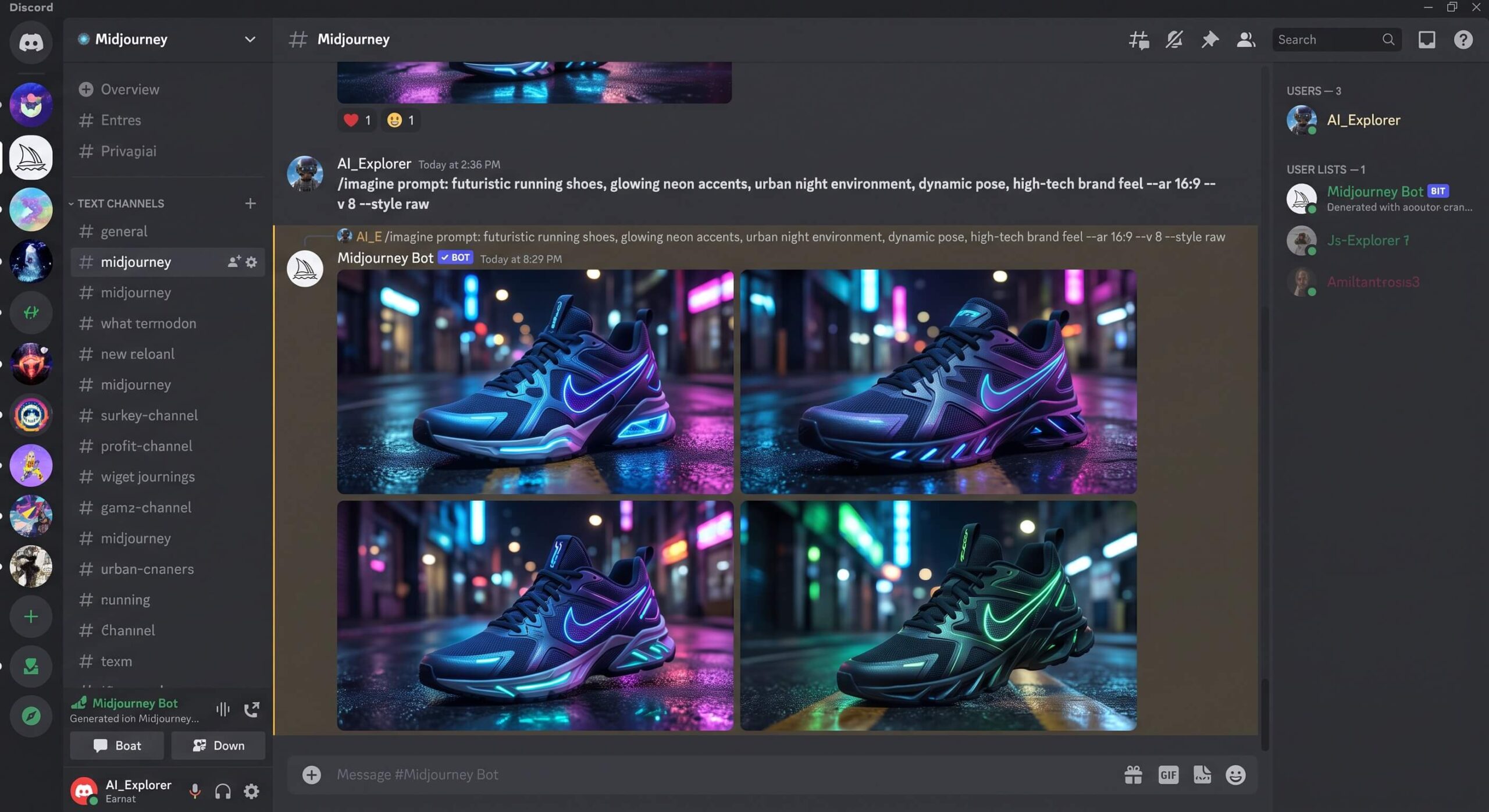
- Step 1. Define Your Visual Brief: Start by clearly outlining the desired aesthetic, subject, and brand elements. For example, ‘Futuristic running shoes, glowing neon accents, urban night environment, dynamic pose, high-tech brand feel.’
- Step 2. Generate Initial Concepts in Midjourney: Use the `/imagine` command in Discord or the web interface with detailed prompts, including `–ar` for aspect ratio and `–style raw` for photorealism. Experiment with variations.
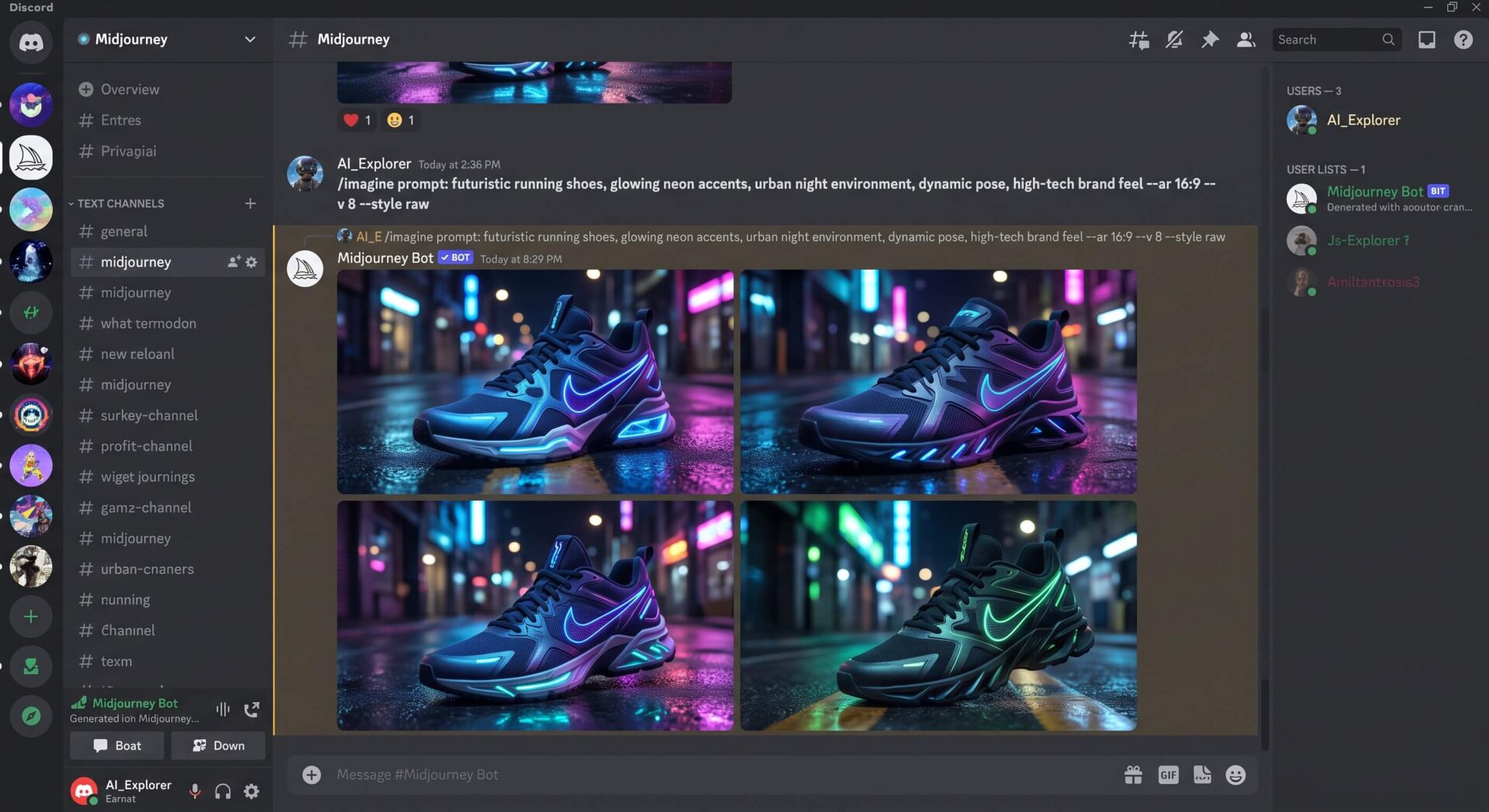
Notre test de Midjourney révèle la capacité de l’IA à prototyper rapidement des visuels. Ces chaussures futuristes aux néons vibrants sont un exemple concret de son potentiel. - Step 3. Select and Upscale Best Candidate: Choose the most promising image from the generated grid and use the ‘U’ buttons to upscale it to a higher resolution. If needed, generate slight variations (‘V’ buttons) or use custom zoom/pan.
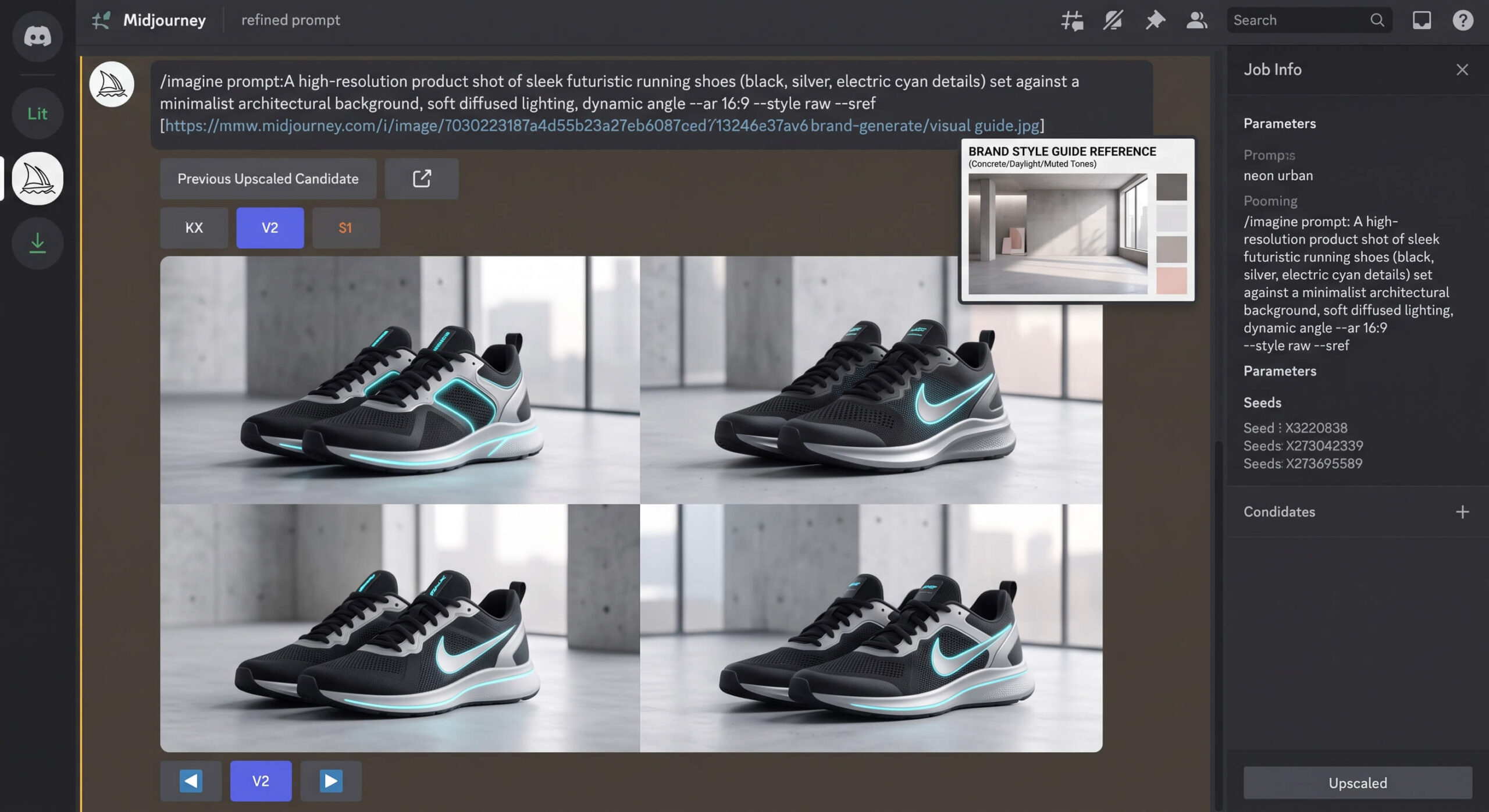
- Step 4. Refine for Brand Consistency with `–sref` (Optional but Recommended): If you have existing brand visuals, re-roll or remix with `–sref [URL]` pointing to a style guide image to subtly integrate color palettes, lighting, and textures into new generations. This ensures stylistic cohesion.
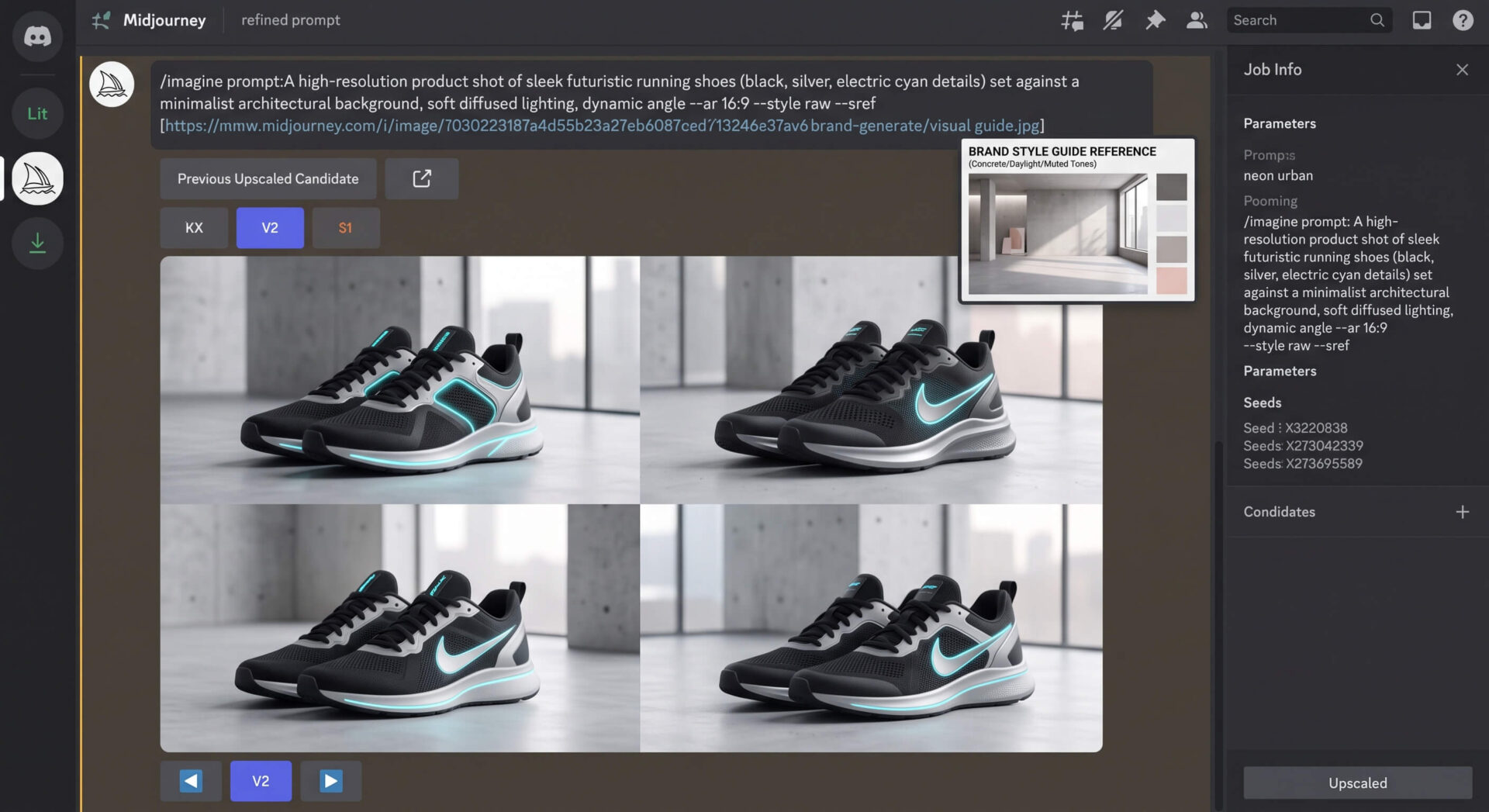
Notre test de Midjourney montre sa capacité à générer des concepts produit précis. Le prompt détaillé et les références de style sont essentiels pour affiner le rendu de ces baskets futuristes. - Step 5. Export to Photoshop for Final Polish: Download the high-resolution image and open it in Adobe Photoshop. Here, you will correct any minor AI artifacts, refine anatomy, precisely integrate brand logos/text (since Midjourney’s text can be imperfect), adjust colors, and composite with any additional assets.
- Step 6. Prepare for Social Media: Optimize the image for specific social platforms, applying final color grading, cropping, and exporting in appropriate formats. This ensures your AI-generated visual is client-ready and perfectly aligned with your campaign.
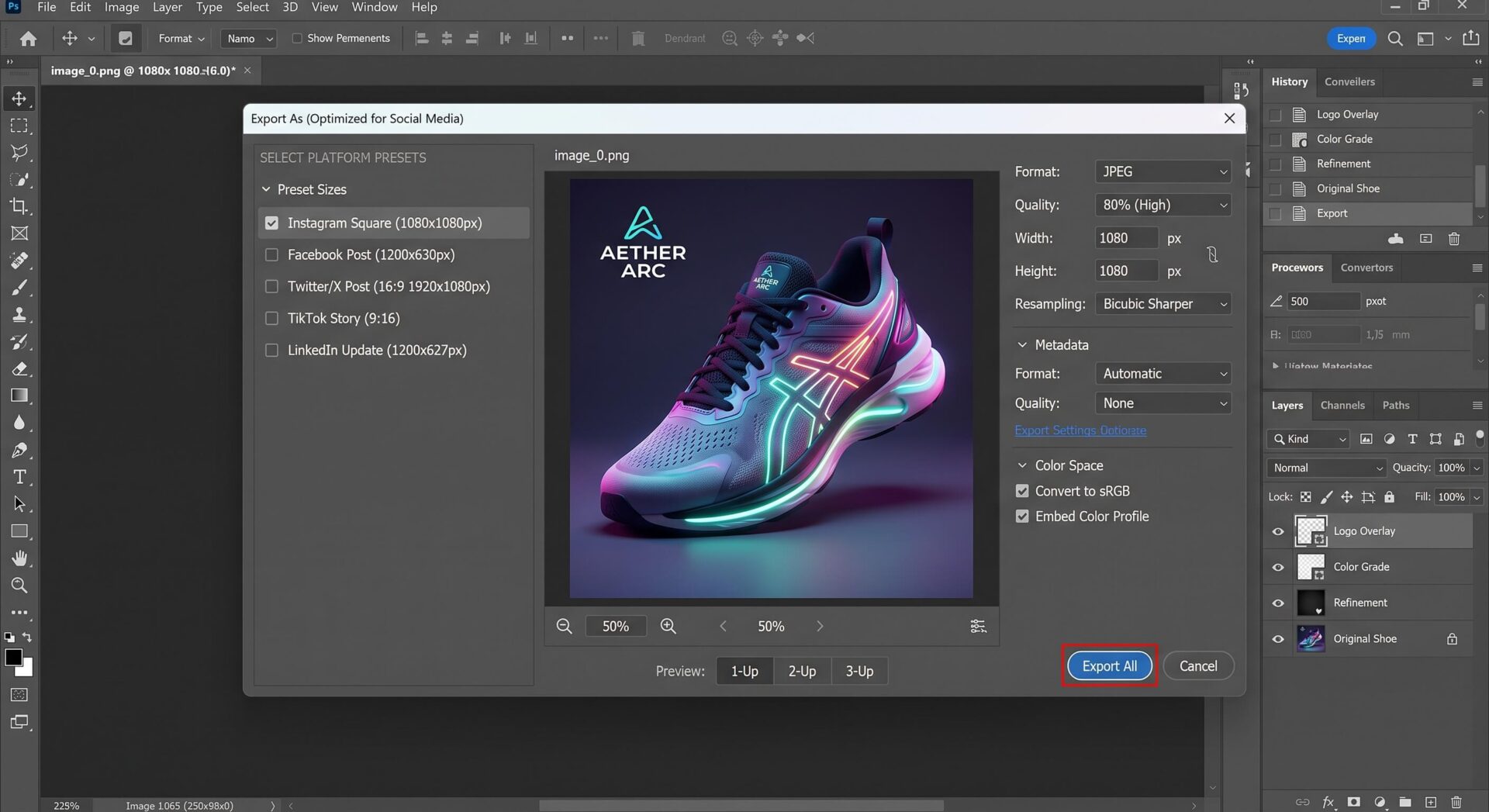
Le concept de chaussure futuriste, né de Midjourney, est ici exporté pour Instagram. Une preuve concrète de la facilité d’intégration des créations IA dans nos workflows habituels.
🟣 PROMPT TEMPLATES FOR MIDJOURNEY
Here are some optimized prompt examples:
Cinematic Sci-Fi Cityscape
Fantasy Character Portrait
Product Photography Mockup
Pricing & Plans
Midjourney operates on a subscription-only model, having eliminated its free tier in late 2024. This means no casual ‘try before you buy’ for new users. Plans are priced based on Fast GPU hours, not image count, which can be a point of confusion for many. The four tiers are: Basic ($10/month or $96/year), offering about 3.3 Fast GPU hours (roughly 200 images); Standard ($30/month or $288/year), with 15 Fast GPU hours and unlimited Relax mode generation; Pro ($60/month or $576/year), providing 30 Fast GPU hours, unlimited Relax mode, and crucial Stealth Mode; and Mega ($120/month or $1,152/year) for high-volume needs. Annual subscriptions offer a 20% discount. Additional Fast GPU hours can be purchased for $4/hour and do not expire. For serious professionals, the Basic plan is barely sufficient, quickly exhausting its Fast hours. The Standard plan is often the sweet spot due to unlimited Relax mode, while Pro is essential for client confidentiality with Stealth Mode. Companies generating over $1,000,000 USD in gross revenue annually are required to purchase the Pro or Mega plan. We find the move to a purely paid model restrictive for experimentation, especially for small businesses or individual creators on a tight budget. The pricing structure, while transparent in GPU hours, still presents a learning curve in understanding actual image output equivalents.
Pro Tips
Pro Tips
- 01
TIP
Master the
--style rawparameter (V6/V8): For truly photorealistic and less ‘opinionated’ results, always include--style rawin your prompts, especially with V6 and V8. This tells Midjourney to adhere more strictly to your prompt and reduce its inherent artistic bias, giving you a cleaner canvas. - 02
ADVICE
Utilize
--srefand--creffor Brand Consistency: When working on a series or a brand campaign, leverage--sref(style reference) and--cref(character reference) with image URLs to maintain a consistent visual style and character likeness across all your generated assets. This is critical for professional projects. - 03
PRO TIP
Layer Prompts with Iterative Refinement: Don’t expect perfection in one go. Start with a broad concept, generate variations (
Vbuttons), and then iteratively refine your prompt by adding more details, changing parameters, or using ‘Remix’ mode to achieve specific elements. Think of it as sculpting. - 04
PRO TIP
Understand
--stylizeImpact: The--stylizeparameter (0-1000) controls Midjourney’s artistic freedom. Lower values make it stick closer to your prompt, higher values give it more creative license. Experiment to find the sweet spot for your desired aesthetic versus prompt adherence.
⚠️ Crash Test & Limitations
Our crash test revealed that while Midjourney excels in artistic output, it exhibits clear limitations, particularly when dealing with complex contextual understanding and precise physical interactions. Attempting to generate ‘a person juggling three specific, oddly-shaped objects while riding a unicycle on a tightrope over a city street’ often resulted in a visually stunning image, but with objects magically floating, limbs bent unnaturally, or the unicycle rider fused with the rope. The AI struggles with the intricate spatial relationships and realistic physics required for such a scene. Similarly, generating images with accurate, specific text beyond one or two words remains a hit-or-miss affair, frequently producing garbled characters or misplaced typography, despite V6’s improvements. Another significant hurdle is body diversity and anatomical consistency; the AI can sometimes default to extreme body types or struggle with intricate hand and finger details, requiring significant re-rolls or post-processing. Finally, for users on lower-tier plans, the public-by-default nature of creations means any generated content is visible to the entire community, making it unsuitable for confidential client work without the expensive Stealth Mode. This fundamental design choice is a major privacy and professional limitation.
What other users are saying
Our review is first and foremost a hands-on take, but it's worth checking it against what other users report elsewhere on the web.
G2 — Midjourney is highly praised for generating artistic, detailed, and visually captivating images, being user-friendly, but concerns exist regarding prompt accuracy, image errors, and the Discord-based workflow. View source
Trustpilot — Reviews are largely negative, highlighting expensive subscriptions, system overloads, declining quality, censorship, poor customer support, and billing issues. View source
Reddit — Discussions are balanced, praising the tool for authentically beautiful images, unique artistic quality, and understanding of composition, but noting issues with prompt adherence for intricate instructions and limited GPU hours. View source
Our take : These external reviews collectively underscore Midjourney's exceptional artistic capabilities and efficiency for creative ideation, while consistently pointing to significant pain points in precise prompt adherence, customer support, and subscription value that an in-house review should critically address.
⚙️ The Ideal Workflow
For a perfect workflow, Midjourney should be combined with Adobe Photoshop for post-processing, compositing, and fine-tuning. Generated images often serve as exceptional base layers or conceptual mockups, but require human artistry to fix anatomical inconsistencies, integrate text accurately, adjust precise brand elements, or perform complex image manipulations. Additionally, a vector graphic editor like Adobe Illustrator could be used for integrating logos or text elements that Midjourney struggles with, ensuring crisp, scalable graphics. For organized asset management and collaborative iteration, a project management tool like Asana or Figma can help track prompts, outputs, and revisions within a team, especially since Midjourney lacks robust native project organization.
Our Review of Midjourney
Strengths
- Unparalleled Aesthetic Quality and Style: Midjourney consistently produces visually stunning images with a distinctive artistic flair, often described as cinematic or painterly, which few competitors can match.
- Exceptional Photorealism: The latest models (V6.1, V8) generate incredibly lifelike images, with intricate details in textures, lighting, and human elements, making them almost indistinguishable from real photographs.
- Robust Community and Learning Resources: The active Discord server provides a vibrant ecosystem for learning, sharing, and getting support from both fellow users and official guides.
- Powerful Control Parameters: Features like Style Reference (`–sref`), Character Reference (`–cref`), and advanced upscalers offer significant control for achieving consistent branding and recurring elements across projects.
Weaknesses
- No Free Tier and Steep Learning Curve: The absence of a free plan makes initial exploration costly, and mastering prompt engineering and parameters demands significant time and practice.
- Public-by-Default Generations (Basic/Standard plans): Unless on a Pro or Mega plan, all generated images are public by default, posing a significant privacy and confidentiality risk for professional work.
- Limitations with Complex Context and Anatomy: Despite improvements, Midjourney can still struggle with maintaining precise relationships between multiple objects in complex prompts or consistently rendering perfect human anatomy and physics.
- Absence of True Video Generation: While it can animate images, Midjourney is fundamentally an image generator and lacks native tools for producing continuous, coherent video clips or integrating into a traditional video editing workflow.
- No Official API for Integrations: The lack of a public API significantly hinders seamless integration with other third-party tools or automated workflows, confining most operations to its Discord or web interface.
🔗 Integrations & API
Security & Privacy
Midjourney employs standard security measures, including encryption for user data in transit and at rest. However, its approach to privacy is fundamentally shaped by its community-driven model. User prompts and generated images are, by default, public and visible to other users, and crucially, Midjourney explicitly uses this data to train and refine its AI models. There is no standard opt-out for this training on consumer-grade accounts. For absolute privacy, users must subscribe to the Pro or Mega plan to access ‘Stealth Mode’, which hides creations from the public gallery. The company states it does not sell personal data and adheres to data protection regulations like GDPR, allowing users to request data deletion. Personal information is stored on Midjourney servers in the US. We advise extreme caution for any professional work involving sensitive or proprietary information, as the public-by-default nature presents inherent risks, even with stated security measures.
Frequently Asked Questions (FAQ)
How do I maintain character consistency across multiple images/scenes in Midjourney?
To maintain character consistency, especially for faces or specific outfits across different images, you should utilize the `–cref` (Character Reference) parameter. Include the URL of a reference image of your character in your prompt: `/imagine prompt: your description here –cref [URL_of_character_image]`. You can also adjust the `–cw` (Character Weight) parameter from 0-100 to control how strongly Midjourney adheres to the reference. Lower values offer more flexibility, while higher values stick closer to the original likeness. Iterative prompting and generating many variations are also key.
What’s the best way to get specific text accurately rendered within an image in Midjourney V6 or later?
While V6 and V8 have improved text rendering, it’s still best for short, distinct words or phrases. To increase accuracy, enclose the desired text in quotation marks within your prompt, for example: `/imagine prompt: a vintage neon sign that reads ‘OPEN’ in bright red, cyberpunk alley, detailed –v 8`. Keep the text concise, place it early in your prompt, and be prepared for multiple re-rolls or minor post-processing in an external editor like Photoshop for perfect legibility and placement.
Can I prevent my Midjourney creations from being publicly visible?
Yes, but it requires a specific subscription tier. By default, all images generated on Basic and Standard plans are public and visible in the Midjourney community gallery. To ensure your creations remain private, you must subscribe to either the **Pro Plan ($60/month)** or the **Mega Plan ($120/month)**, which include ‘Stealth Mode.’ Activating Stealth Mode ensures that your generated images are not visible to other users on the platform.
Alternatives Comparison
| Tool | Ideal For | Starting Price | Free Version | Global Score |
|---|---|---|---|---|
| Stable Diffusion | Open-source enthusiasts, ultimate customization, local installation, and private generation. | Free (open-source, local run) / Varied (cloud-based services) | Yes | 8.5 |
| Adobe Firefly | Professional designers, seamless Creative Cloud integration, commercial-safe training data, and legal indemnification. | Subscription (part of Creative Cloud or standalone) | Yes (limited credits) | 9.0 |
| DALL-E 3 (via ChatGPT Plus) | Users needing strong text rendering, convenient integration with conversational AI, and general high-quality image generation. | $20/month (ChatGPT Plus subscription) | No (requires ChatGPT Plus) | 8.0 |
| Leonardo AI | Game developers, creators focused on advanced fine-tuning, business-focused asset management, and artistic images. | Free (150 tokens/day) / Paid tiers | Yes | 8.8 |
| Ideogram AI | Users prioritizing accurate text rendering in images and consistent character generation. | Free (10 prompts/day) / Paid tiers | Yes | 8.3 |
Take action: try Midjourney today!
Ready to see what Midjourney can really do for you? Give it a try and judge the results for yourself.
Top 3 Alternatives to Midjourney
 Free
FreeDALL-E 3
20$/monthDALL-E 3: OpenAI's advanced AI image generator. Translates text prompts into high-quality, detailed visuals. Easy to use, versatile styles.

Creator of IActualité and a rigorous tech tester. With a keen analytical mind and surgical precision, I put AI tools through their paces to deliver practical guides and transparent, unfiltered verdicts. Passionate about Linux, robots, and pop culture!
L'intelligence artificielle, c'est comme un T-Rex dans un parc d'attractions : c'est fascinant à observer, mais il vaut mieux savoir exactement comment la clôture a été codée avant de s'en approcher.
0 Comments