

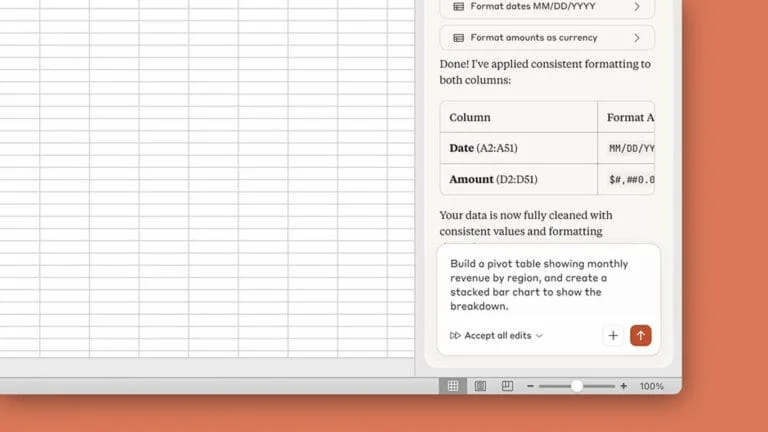

Forget static, predictable Excel. Claude’s native integration unlocks an unprecedented cognitive dimension for data management. It’s no longer just a tool; it’s a conversational partner for your numbers. Imagine never having to leave your familiar cells to automate complex tasks, enhance the reliability of your analyses, and exponentially boost your productivity. And guess what? This is already our reality in 2026.
How Claude Integrates into Your Data-Driven Workflow
Putting Claude and Excel to work together in your environment requires a bit of method. But let’s be clear, this isn’t science fiction. A few prerequisites are necessary to ensure this powerful AI in spreadsheets runs smoothly.
Technical Prerequisites
First, an active Microsoft 365 subscription is required to access the add-in store and install the extension. On the Anthropic side, a business account or a valid API key is often necessary. Claude Pro or Team subscribers benefit from even more seamless integration, capable of directly linking their resources. The good news is that the web version of Excel, as well as desktop versions for Windows and Mac, are compatible. A stable internet connection is key, as the AI resides on Anthropic’s cloud servers for real-time processing.
Easy Installation for Individuals
For the average user, it happens in the “Insert” tab of your Excel ribbon. One click on “Get Add-ins,” search for “Cowork for Claude,” and voilà, you add it to the interface. A side panel appears, inviting you to log in to your Anthropic account, and secure synchronization begins. Honestly, it takes less time than finding the right VLOOKUP formula.
Strategic Enterprise Deployment
For large organizations, system administrators manage this centrally via the Microsoft 365 admin center. They authorize or restrict Claude’s use according to departments, always keeping an eye on data governance. Sensitive information remains within the company’s security perimeter. This is crucial to avoid unpleasant surprises. IT managers can even monitor resource consumption and the number of requests to adjust subscriptions, much like an orchestra conductor ensuring everything is in harmony.
What are the main benefits of using Anthropic’s Claude with Excel?
Using Anthropic’s Claude within Excel dramatically elevates your data handling capabilities, transforming routine tasks into streamlined processes. This AI in spreadsheets helps you automate tasks like instantly generating complex pivot tables from raw data or having Claude suggest the most relevant charts to visualize your findings, all through simple conversational prompts, ultimately helping to enhance analysis and boost productivity. This level of intuitive interaction not only accelerates analysis but also democratizes advanced Excel functions, making them accessible even to users who aren’t spreadsheet gurus. Beyond basic automation, Claude acts as an intelligent co-pilot, significantly reducing the time spent on data cleaning and validation. For instance, it can quickly identify inconsistencies in large datasets, suggest corrections, or even write custom VBA scripts to automate repetitive data entry. This proactive assistance minimizes human error, ensuring higher data integrity and freeing up valuable time for strategic decision-making rather than manual grunt work. The integration empowers users to unlock deeper insights from their data with unprecedented speed and accuracy.
Your Personal AI Assistant for Smart Spreadsheets
Using Claude daily is a bit like having a dedicated AI assistant for Excel. Gone is the frustration of complex formulas or repetitive tasks. This AI in spreadsheets analyzes, understands, and acts on your data to automate tasks, freeing up valuable time for more strategic analyses and helping to boost productivity. It’s the famous shift from “how to do” to “what to do.”
⏪ Before AI
- 3 hours to analyze revenue variations with complex formulas.
- Hours of manual work to harmonize disparate date formats.
- Creating forecast budgets from scratch, cell by cell.
- Tedious debugging of formula errors, line by line.
⏩ With Claude
- “Explain the atypical revenue variations from the last quarter” → Instant textual summary.
- “Harmonize date formats and capitalize city names” → Done in seconds.
- “Generate a forecast budget structure for a marketing project with fixed and variable costs” → Complete template generated.
- “Find why this formula returns an error on line 42” → Immediate syntax correction.
It’s not magic, but it sure feels like it. Claude, for instance, excels at analyzing unstructured data or identifying hidden trends. You can ask it to “summarize customer feedback from the last quarter and identify recurring negative points” to get an actionable synthesis in a few clicks. This ability to transform natural language into concrete actions within your spreadsheet is simply astonishing. We’re moving from a mere document to a true intelligent agent. Beyond simple error correction, AI proves to be an ally for creation. Novices can generate complex models without ever touching a macro. Experts, meanwhile, can rely on Claude to write more elaborate VBA scripts, thereby accelerating the development of their internal tools. This translates to time savings of dozens of hours per month for some teams.
Data Governance and Security
The integration of AI into sensitive tools like Excel raises crucial security and confidentiality questions. It is vital to ensure that information processed by Claude, especially sensitive company data, complies with internal policies and current regulations like GDPR. According to Gartner, by 2026, 70% of enterprises will struggle with AI data governance, highlighting the need for robust frameworks. Monitoring by IT administrators is an indispensable layer of protection.
The fact is that this synergy between conversational AI and an omnipresent productivity tool like Excel marks a decisive step. It doesn’t just make work faster; it makes it smarter. The collaboration between human and machine reaches a new level, where humans provide intuition and strategy, and AI provides computational power and automated execution. For developers, this means less time spent coding basic functions and more time innovating. For analysts, it’s the end of endless pivot tables and the beginning of an era where every data point tells a story, explained by AI. This alliance redefines how we handle numbers daily, freeing our minds for higher-value tasks. It’s one of the most concrete steps towards a future where AI doesn’t replace our tools but transcends them.
Chargement de la galerie…

About Rigaud Mickaël
Passionate about tech and a Linux enthusiast, I decipher AI with a unique and intense vision to make it useful to all, between robots, rock and the geek universe.