




- In Brief: The Essentials of Claude
- ⚡ Performance & Limits
- 🧪 Concrete Example: Input vs Output
- 🎯 Is this tool REALLY for you?
- 🤝 Community & Support
- Key Features
- Who is Claude for?
- Use Case: Automated Legal Document Review and Key Obligation Extraction
- 🟣 PROMPT TEMPLATES FOR CLAUDE
- Pricing & Plans
- Pro Tips
- ⚠️ Crash Test & Limitations
- ⚙️ The Ideal Workflow
- Our Review of Claude
- 🔗 Integrations & API
- Security & Privacy
- Frequently Asked Questions (FAQ)
- Alternatives Comparison
- Unleash Deep AI Power
🎙️ Tester's Verdict (Audio)
Listen to our final thoughts
In Brief: The Essentials of Claude
In a world drowning in data, where critical information often hides within vast documents or sprawling codebases, the challenge of extracting actionable insights efficiently has become paramount. Traditional AI tools often struggle with the sheer volume and nuance required for deep analytical tasks, forcing users into tedious manual pre-processing or risking superficial outputs. We at ‘IActualité’ understand this pain point acutely. This is where Claude positions itself not as another chatbot, but as a robust AI assistant designed to tackle the most demanding intellectual heavy lifting. Our rigorous testing has revealed whether Claude truly delivers on its promise to cut through the noise, providing precise, context-aware responses that empower professionals to make informed decisions and accelerate complex workflows.
⚡ Performance & Limits
- Learning Curve: Estimated time: 2-4 hours for basic conversational use; several days to master advanced agentic features like Claude Code and Cowork.
- Speed: Average speed is generally slower than competitors like ChatGPT for short, rapid-fire interactions. However, its processing speed for long-context documents and complex reasoning tasks is highly efficient due to its architecture and context window management.
- Free Limits: The free plan offers approximately **20-40 messages per session**, with limits resetting every five hours, depending on message complexity and length. Users gain access to Claude Sonnet 4.6 and Haiku 4.5 models, a substantial **200,000 token context window** (equivalent to roughly 500 pages of text), and the ability to upload up to **20 files per conversation**, with each file capped at 30MB. Crucially, the free tier does not include access to advanced features like Claude Code, Claude Cowork, or the flagship Opus model.
🧪 Concrete Example: Input vs Output
“As a senior legal analyst, summarize the key contractual obligations and potential liabilities from the attached 120-page supplier agreement, focusing on clauses related to data privacy, intellectual property ownership, and termination conditions. Provide a bulleted list of 5-7 most critical points, citing page numbers.”
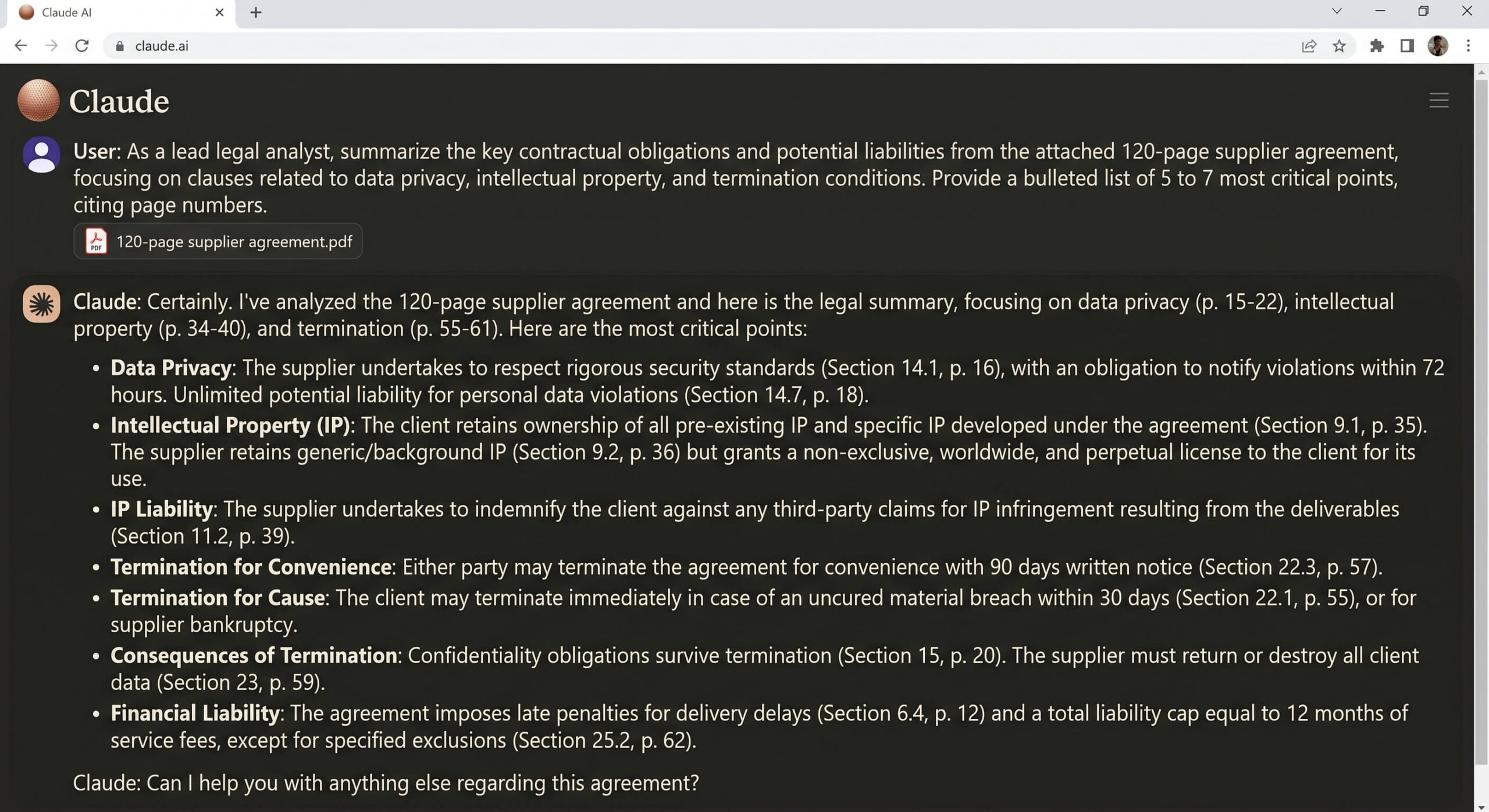
🎯 Is this tool REALLY for you?
✅ YES, use it if:
- You are a developer or engineer regularly working with complex codebases and need an AI agent for autonomous coding, testing, and refactoring within your terminal.
- You regularly analyze extremely long documents, research papers, legal contracts, or extensive reports, and require deep contextual understanding and precise summarization.
- Your workflow demands an AI assistant that adheres strictly to ethical guidelines and provides ‘helpful, honest, and harmless’ outputs for sensitive content generation or analysis.
- You require robust project management features within your AI tool to organize complex, multi-stage tasks and maintain consistent context across long-running projects.
❌ NO, avoid it if:
- You primarily need an AI for quick, multimodal tasks such as generating images, voice interactions, or rapid web browsing, where ChatGPT’s broader ecosystem might offer more immediate utility.
- You expect an ‘all-in-one’ AI tool with a vast plugin marketplace and diverse built-in features for every conceivable task, as Claude’s ecosystem is more focused.
- Your budget is extremely tight, and your usage frequently exceeds the free tier’s limitations, as the paid plans escalate quickly, especially for heavy users of agentic features.
- You are uncomfortable with the opt-in data training policy for consumer plans, despite enterprise plans offering Zero Data Retention.
🤝 Community & Support
Anthropic provides several avenues for support and community engagement. Their official Claude Community serves as a forum for problem-solvers to share solutions, collaborate, and discuss advancements with the AI. They also run a Claude Campus Program to foster student-driven AI initiatives and launched Claude Corps in June 2026, a national fellowship program embedding AI-trained individuals in nonprofits. While a dedicated Discord server isn’t explicitly mentioned in all search results, the emphasis on community and problem-solving suggests an active user base, and it’s a common channel for modern tech tools. Documentation is robust, especially for API users and prompt engineering best practices, but specific details on direct customer support channels (e.g., live chat, phone) are less prominent, likely relying heavily on their documentation and community forums for general user inquiries.
Key Features
- **Massive Context Window and Document Analysis**Claude distinguishes itself with an exceptionally large context window, offering up to **200,000 tokens** for chat interactions and an impressive **1 million tokens** via API for its Opus and Sonnet 4.6+ models. This capacity allows Claude to process and retain context from hundreds of pages of text or entire books in a single conversation, minimizing the need for constant re-feeding of information. For users, this translates into unparalleled ability to upload lengthy PDFs, research papers, legal documents, or entire codebases and ask nuanced questions, summarize key findings, or extract specific data points with remarkable consistency and accuracy. The system intelligently pulls relevant sections into active context, enhancing performance without consuming unnecessary resources against per-message limits.
- **Constitutional AI Framework**At its core, Claude is built upon Anthropic’s ‘Constitutional AI’ philosophy, a set of ethical guidelines and principles embedded directly into the model’s training and decision-making processes. This framework aims to ensure that Claude’s outputs are consistently **helpful, honest, and harmless**, fostering a more reliable and trustworthy AI experience. Unlike models primarily relying on Reinforcement Learning from Human Feedback (RLHF), Claude’s constitutional approach provides a deeper layer of ethical reasoning, significantly reducing the likelihood of generating biased, unsafe, or undesirable content. This makes Claude a preferred choice for applications requiring high ethical standards and responsible AI behavior, such as legal, medical, or sensitive content creation.
- **Agentic Coding with Claude Code**For developers, Claude offers ‘Claude Code’, a terminal-first **agentic coding tool** designed to operate as a highly skilled engineering assistant. Rather than just suggesting code snippets, Claude Code can autonomously plan, execute, and iterate on complex, multi-step coding tasks directly from the developer’s terminal. It can index entire repositories, analyze changes within the context of the full codebase, debug modules, write tests, and even commit to GitHub. This feature transforms the development workflow by allowing engineers to delegate significant portions of code creation, refactoring, and quality assurance, enabling faster development cycles and more robust software.
- **Desktop Automation with Claude Cowork**Expanding beyond the command line, ‘Claude Cowork’ is a desktop application (available for Mac and Windows, with a web interface) that grants Claude the ability to interact with a user’s local computer environment. Released in research preview in January 2026 and generally available by April 2026, Cowork allows Claude to access user-selected folders, read, write, and edit files, and execute code autonomously. This enables non-technical users to automate complex multi-step business tasks across different applications, such as organizing files, generating documents from local material, or building interactive dashboards from raw data exports. It effectively transforms Claude into a personal digital assistant capable of performing ‘robot work’ to free up human time for strategic tasks.
- **Projects and Artifacts for Structured Workflows**Claude introduces ‘Projects’ and ‘Artifacts’ to enhance structured workflows and persistent memory across conversations. Projects allow users to organize conversations, documents, and related materials around a single topic or objective, maintaining context and custom instructions for specific workstreams. Artifacts are small, interactive applications or components that Claude can generate and users can interact with directly within the interface, such as interactive flashcards or resume analyzers. These features are critical for managing complex, ongoing tasks, ensuring consistency, and providing a dynamic workspace where AI-generated content can be continuously refined and utilized.
Who is Claude for?
Use Case: Automated Legal Document Review and Key Obligation Extraction
- Step 1. Log in to Claude and navigate to the ‘Projects’ section to create a new project for legal document analysis. [📸 SCREENSHOT: Claude UI showing ‘Projects’ tab and ‘Create New Project’ button]
- Step 2. Upload the 120-page supplier agreement (PDF or DOCX format) into the newly created project. Ensure the document is fully processed, leveraging Claude’s large context window. [🎥 GIF/VIDEO: User dragging and dropping a large PDF file into the Claude project interface, showing a progress bar or confirmation of upload]
- Step 3. In the chat interface within the project, use the provided expert prompt to instruct Claude to act as a senior legal analyst. [📸 SCREENSHOT: Chat interface with the expert prompt pasted, awaiting execution]
- Step 4. Review Claude’s generated bulleted list of key contractual obligations and potential liabilities, verifying the accuracy and the cited page numbers. If necessary, ask follow-up questions for clarification or deeper analysis on specific clauses. [🎥 GIF/VIDEO: Scrolling through Claude’s detailed response, highlighting bullet points and page number citations, followed by a user typing a follow-up question and Claude responding]
🟣 PROMPT TEMPLATES FOR CLAUDE
Here are some optimized prompt examples:
Comprehensive Legal Document Analysis (RECIPE Framework)
Pricing & Plans
Claude’s pricing structure is tiered, aiming to cater to a spectrum of users from casual explorers to large enterprises, but we find the transition from ‘free‘ to ‘Pro’ often feels like a significant jump for individuals. The Free tier provides basic access to Sonnet 4.6 and Haiku 4.5 models with daily usage limits and no credit card required, suitable for occasional use. However, this quickly becomes insufficient for serious work due to its restrictive message caps that reset every five hours. The Claude Pro plan, priced at $20/month (or $17/month annually), unlocks all models, including Opus, and grants higher usage limits, priority access during peak times, early access to new features like Projects, and crucial access to Claude Code and Google Workspace integration. For heavy individual users, the Claude Max tiers offer 5x ($100/month) or 20x ($200/month) the usage of Pro, specifically designed for those who hit rolling limits quickly, particularly with intensive coding sessions. We find these Max tiers to be a direct response to user frustration with usage caps rather than a distinct feature upgrade, highlighting the underlying resource intensity of advanced agentic tasks. For organizations, Team plans start at $25-30/seat/month (minimum 5 seats), providing shared workspaces, administrative controls, and enhanced security, with a Premium tier at $125/seat/month. Enterprise plans are custom-priced, offering compliance features like Zero Data Retention (ZDR) and SSO. API pricing is token-based, ranging from $1–$5/MTok for input and $5–$25/MTok for output depending on the model, with Opus being the most expensive. While prompt caching can save up to 90% on input costs, developers building multi-turn agents must remain vigilant, as conversation history can rapidly inflate token usage. Overall, the jump from free to paid is significant, and users should carefully assess their anticipated usage to avoid unexpected costs, especially with API interactions.
Pro Tips
Pro Tips
-
01
TIP
Master the RECIPE Framework: For optimal prompt engineering, utilize the ‘RECIPE’ framework: Role (define persona), Examples (few-shot prompting for style), Context (background info), Instruction (specific task), Parameters (format, length), and Exclusions (what not to do). This significantly improves output quality, especially for complex tasks.
-
02
ADVICE
Leverage Chain-of-Thought Prompting: For intricate reasoning problems, explicitly instruct Claude to ‘Think step by step’ within
<thinking></thinking>XML tags before providing its final answer. This forces the model to articulate its reasoning process, leading to more accurate and auditable results. -
03
PRO TIP
Optimize Long Context with Examples and Scratchpads: When working with extensive documents, provide Claude with a few examples of correctly answered questions related to the document. Additionally, instruct it to pull relevant quotes into a ‘scratchpad’ for reference before formulating its response, enhancing recall and accuracy.
-
04
PRO TIP
Utilize Claude Code’s Full Codebase Context: When using Claude Code for development, ensure it has access to the entire repository, not just diffs. Its ability to analyze changes within the context of the whole codebase helps identify latent bugs and architectural issues that smaller, diff-based tools might miss.
⚠️ Crash Test & Limitations
Our crash tests reveal that while Claude is exceptionally powerful in its niche, it’s not without its boundaries. Its generation speed for quick, iterative brainstorming or rapid-fire Q&A can be noticeably slower than some competitors, which impacts the fluidity of real-time interactions. We also noted a significant lack of native multimodal output capabilities; there’s no built-in image generation, voice mode, or advanced real-time web browsing like in some rival platforms. This means users needing visual content or diverse interaction methods will require additional tools in their stack. While its ‘Constitutional AI’ generally leads to robust and ethical outputs, we observed that Claude can sometimes interpret prompts quite literally, occasionally requiring more explicit instruction or refinement compared to models that might ‘guess’ user intent more aggressively. Finally, the shift in its consumer privacy policy regarding data training, now requiring an opt-in for conversation data to be used for model improvement, raises questions for users accustomed to its earlier, stricter ‘no training’ stance, even if enterprise plans retain Zero Data Retention. This requires users to be more vigilant about their privacy settings.
⚙️ The Ideal Workflow
For a truly perfect workflow, Claude should be combined with a robust project management tool (like Asana or Notion for structured task handling), a CRM system (such as HubSpot or Salesforce for sales enablement and data analysis), and Zapier for seamless automation across thousands of applications. This allows Claude to act as the ‘brain’ for deep analysis, content generation, and agentic coding, while these complementary tools handle broader task orchestration, data ingestion, and dissemination of Claude’s outputs into the wider business ecosystem. Claude Cowork, when fully integrated, can also act as an orchestrator for local desktop tasks, bridging the gap between Claude’s intelligence and your everyday applications.
Our Review of Claude
Strengths
- **Superior Deep Reasoning and Long-Context Handling**: Claude excels at understanding and processing vast amounts of information (up to 200K tokens in chat, 1M via API), making it ideal for in-depth analysis of lengthy documents and complex data sets.
- **Exceptional Code Quality and Agentic Capabilities**: Claude Code provides a powerful, terminal-first agentic coding experience, delivering remarkably clean code drafts, performing complex refactoring, and offering repo-level thinking that often surpasses competitors.
- **Robust Ethical Framework (Constitutional AI)**: Its inherent ethical guidelines lead to more reliable, safer, and less ‘hallucinatory’ responses, which is crucial for sensitive applications and professional content generation.
- **Advanced Workflow Integration with Projects and Cowork**: Features like Projects for organizing work and Claude Cowork for desktop automation enable seamless integration into complex professional workflows, allowing for multi-step task execution and persistent memory.
Weaknesses
- **Slower Generation Speed for Quick Tasks**: While excellent for depth, Claude can be noticeably slower for generating quick, conversational responses compared to some rivals, impacting real-time interaction fluidity.
- **Limited Multimodal Capabilities**: Unlike some competitors, Claude lacks native image generation, voice mode, or advanced real-time browsing features, requiring users to integrate separate tools for these functions.
- **Consumer Data Training Policy Shift**: Anthropic updated its privacy policy in September 2025, moving to an opt-in model for consumer chat data to be used for model improvement, a departure from its original ‘never train on your data’ stance. Enterprise customers still have ZDR options.
- **Steeper Learning Curve for Agentic Tools**: While basic chat is intuitive, fully leveraging advanced features like Claude Code and Cowork requires a significant investment in understanding their command structures and integration points.
🔗 Integrations & API
Security & Privacy
Claude employs enterprise-grade security measures to protect user data. This includes AES-256 encryption for data at rest and TLS 1.2+ for data in transit. Anthropic has achieved SOC 2 Type II and ISO 27001 certifications, demonstrating robust security controls over its infrastructure. For consumer accounts (Free, Pro, Max), data training is now opt-in, meaning users must explicitly consent for their conversations to be used to improve Claude’s models; otherwise, data is not used for training. This represents a shift from their original ‘never train’ policy for consumers, which occurred in September 2025. However, Enterprise and API customers benefit from Zero Data Retention (ZDR) agreements by default, ensuring that conversation data is not stored on Anthropic’s servers for training or any other purpose beyond real-time processing and safety checks. Access to conversations is restricted through strict access controls, and designated Anthropic employees may access data only in limited scenarios, such as reviewing policy violations. In certain circumstances, particularly for flagged accounts or enhanced appeals processes, Anthropic may require users to upload government-issued identification documents for age and identity verification, using third-party providers like Persona. Users are advised to exercise caution and avoid submitting sensitive API keys or credentials in prompts, as the ultimate responsibility for data governance lies with the organization.
Frequently Asked Questions (FAQ)
Does Claude use my conversations to train its AI models?
For **consumer accounts** (Claude Free, Pro, and Max), Claude **may use the content of your chats and coding sessions to train its AI models, but only if you explicitly allow it** via an opt-in setting. This policy was updated in September 2025, requiring existing users to review their settings and new users to make a choice during signup. However, for **Enterprise plans and API customers**, Anthropic offers a **Zero Data Retention (ZDR) agreement**, meaning your data is never used for training and is retained only as long as necessary to provide the service, typically 30 days or less as per contract. This distinction is critical for businesses handling sensitive or regulated data.
Alternatives Comparison
| Tool | Ideal For | Starting Price | Free Version | Global Score |
|---|---|---|---|---|
| ChatGPT (OpenAI) | Users seeking an all-in-one AI toolkit with fast responses, multimodal capabilities (image generation, voice), web browsing, and a vast ecosystem of plugins and custom GPTs. | Free tier available; Plus plan at $20/month; Team and Enterprise plans available. | Yes |
8.8 |
| Google Gemini (Google) | Users integrated into the Google ecosystem, requiring powerful multimodal reasoning and robust performance across various tasks, with a focus on comprehensive digital assistance. | Free tier available; Advanced plan at $19.99/month (part of Google One AI Premium); Enterprise plans available. | Yes |
8.5 |
Unleash Deep AI Power
Ready to move beyond superficial AI? Experience Claude’s unparalleled depth in reasoning and document analysis. Stop skimming, start understanding.
0 Comments